
ASUS Ascent GX10 Review: 256GB Dual-Node AI Supercomputer on My Desk
Two of these machines on one desk, joined by a single passive copper cable, run a trillion-parameter frontier model with a one-million-token context, entirely inside your own LAN. The ASUS Ascent GX10 is NVIDIA’s GB10 Grace Blackwell superchip in a 150mm cube: 128GB of unified LPDDR5x, 1 PFLOP of FP4 compute, and — the part almost nobody demonstrates — dual 200-gigabit ConnectX-7 QSFP cages that let you bolt two units together into one 256GB compute pool.
We bought two with our own money, linked them, and ran DeepSeek V4 Flash on them for multiple days. This is what actually happened, including the first-boot trap that makes a fresh unit look completely dead.
TL;DR — The 10-second verdict
| What it is | A 150mm desktop AI appliance built on the NVIDIA GB10 Grace Blackwell superchip — 128GB unified memory, 1 PFLOP FP4, dual 200GbE ConnectX-7 cages |
| Who it’s for | Homelab architects, developers, and researchers who want frontier-scale local inference with zero data leaving the LAN |
| The headline | Two units + a $179 DAC cable = 256GB unified memory running DeepSeek V4 Flash at 60–83 tok/s with a 1M-token context — and it idles around 43W per box |
| The catch | Not a workstation, not plug-and-play: no USB-A, no audio jack, a first-boot network trap that blocks headless SSH, and a 167GB-per-node model download |
| Our take | The most interesting AI hardware we’ve tested this year. Also genuinely server-grade fussy — if you just want to use DeepSeek, rent the API |
| Where To Buy (Affiliate Links) | Amazon · Mavely · JoyLink |
| Video Review | YouTube |
The Setup — every command, start to finish
This is the whole build. Two nodes, one cable, one config file. The long part is the download, which can run overnight.
Step 0 — On both nodes: create your user, then fix the network trap. A fresh GX10 has no user accounts at all, and its installer marks the Ethernet and Wi-Fi profiles user-owned. NetworkManager only brings a user-owned connection up when that user has an active logged-in desktop session, so a cold boot with no monitor attached means no network, no SSH, and a machine that looks bricked. Mark the profiles system-owned and it survives every reboot:
# On BOTH nodes, after the first-boot wizard has created your admin user
sudo nmcli connection modify "Wired connection 3" connection.permissions ""
sudo nmcli connection modify "NTHOME" connection.permissions ""

# Turn off autoconnect for the unused wired profiles. If you use the
# ConnectX fabric port, EXCLUDE it (that is what breaks the cluster).
for n in 1 2 4; do sudo nmcli connection modify "Wired connection $n" connection.autoconnect no; done
Step 1 — On both nodes: clone the recipe and allow Docker.
git clone https://github.com/MiaAI-Lab/DeepSeek-v4-Flash-DSpark-2x-DGX-Spark.git ~/spark-demo
cd ~/spark-demo
sudo usermod -aG docker $USER      # then log out and back in (new SSH session)
Step 2 — On both nodes: pull the runtime image. The digests must match on both boxes or TP=2 will not come up.
docker pull ghcr.io/anemll/dspark-vllm-gx10:0.1.1Step 3 — On the HEAD node: configure the cluster. Copy the example file and set the fabric addresses. Leave the serving knobs at their defaults unless you mean to change them.
cp .env.dspark.example .env.dspark
grep -E '^(WORKER_HOST|MASTER_ADDR|MASTER_PORT)=' .env.dspark
The example ships with placeholders. What you fill in, using your own QSFP interface names:
WORKER_HOST=10.0.0.2
MASTER_ADDR=10.0.0.1
MASTER_PORT=25000
NCCL_IB_HCA=rocep1s0f1
NCCL_SOCKET_IFNAME=enp1s0f1np1
TP_SOCKET_IFNAME=enp1s0f1np1
GLOO_SOCKET_IFNAME=enp1s0f1np1
VLLM_HOST_IP=10.0.0.1
WORKER_VLLM_HOST_IP=10.0.0.2
Step 4 — On both nodes, in parallel: cache the model. This is the ~167GB download per node. Do not watch it live.
./prepare-dspark-model-cache.sh --officialStep 5 — On the HEAD node: start it. The worker comes up first by design. If dockerd already restored the ranks after a reboot, the script exits with code 3 and an “already running” hint — that is the guard working, not a failure.
./start-deepseek-v4-flash-dspark.shStep 6 — Verify. Expect the model id and a 1,048,576-token ceiling:
curl -fsS http://127.0.0.1:8888/v1/models
./smoke-deepseek-v4-flash-dspark.sh
./status-deepseek-v4-flash-dspark.sh
Day-to-day: ./status-deepseek-v4-flash-dspark.sh, ./logs-deepseek-v4-flash-dspark.sh, ./stop-deepseek-v4-flash-dspark.sh.
⚠️ Two things that will bite you. Disable earlyoom on both hosts — it will kill vLLM under deep-context load. And never run the network-permission fix against the ConnectX fabric profile: breaking that connection kills NCCL after the next reboot.
⚠️ Never disable the wrong wired profile. On a fresh box the autoconnect loop is 1 2 4 5; on a live cluster where Wired connection 5 is the fabric port, it is 1 2 4 only.
Hardware & Specs
The GB10 is not a desktop CPU. It’s a superchip — a 20-core Arm CPU (10× Cortex-X925 performance cores + 10× Cortex-A725 efficiency cores) paired with a Blackwell GPU on the same package, joined by NVLink-C2C so the CPU and GPU share one coherent memory address space.
| Component | Specification |
|---|---|
| Superchip | NVIDIA GB10 Grace Blackwell |
| CPU | 20-core Arm — 10× Cortex-X925 + 10× Cortex-A725 |
| GPU | Blackwell, 6,144 CUDA cores, 5th-gen Tensor Cores, 4th-gen RT Cores |
| AI performance | Up to 1 PFLOP FP4 (sparse) |
| Memory | 128GB LPDDR5x coherent unified, 256-bit, 273 GB/s |
| Internal interconnect | NVLink-C2C (CPU↔GPU coherent) |
| Cluster networking | ConnectX-7 SmartNIC, dual QSFP, 200GbE per link |
| Networking | 10GbE RJ-45, Wi-Fi 7 (AW-EM637), Bluetooth 5.4 |
| Storage | 1TB / 2TB PCIe 4.0 NVMe, or 4TB PCIe 5.0 (single M.2 slot) |
| Display | 1× HDMI 2.1 |
| USB | 3× USB-C 20Gbps (DisplayPort 2.1 alt mode) + 1× USB-C power input |
| Power | 240W USB-C PD 3.1 Extended Power Range |
| Dimensions | 150 × 150 × 51 mm |
| Weight | 1.48 kg |
| OS | Ubuntu-based DGX OS |
Design notes
- Density is the first impression. 150mm on a side, 1.48kg — literally the size and shape of a hardcover novel, and it feels like a solid block of aluminium.
- A front power button. Several other GB10 variants don’t have one. Small thing, genuinely welcome.
- The rear panel, left to right: Kensington lock, USB-C power input (180W), three USB-C 20Gbps ports with DP 2.1 alt mode, full-size HDMI 2.1, 10GbE RJ-45, and the two QSFP cages wired to the ConnectX-7 NIC.
- What’s missing is the point. No USB-A. No 3.5mm audio jack. No microSD. This is a network appliance that crunches tensor math, not a family desktop.
- Unified memory is the architectural trick. The GPU addresses the full 128GB pool directly — no host-to-device staging, no PCIe bus bottleneck. That’s why a 65GB model that flatly refuses to load on a 32GB consumer card runs here without complaint.
The 200-Gigabit Fabric
This is the feature that makes two GX10 units genuinely special, and it’s the part almost no one on YouTube demonstrates.
You don’t need a switch, and you don’t need InfiniBand. A single passive direct-attach copper cable between the outermost QSFP ports of both nodes establishes RDMA over Converged Ethernet at MTU 9000.
ethtool enp1s0f1np1 | grep -E "Speed|Link detected"Speed: 200000Mb/s
Link detected: yesThat’s a full 200 gigabits per second, zero packet loss, and roughly 1.3ms round-trip latency across the cluster. It’s what Tensor Parallelism rides on — and it’s why the two boxes can behave as one compute pool instead of two separate machines.
Watch which port you use. We ran the outermost cage on both nodes. The recipe also expects NCCL_SOCKET_IFNAME to match the QSFP interface on both nodes — if it doesn’t, you get an NCCL timeout or a hang at model load rather than a clean error.
Clustered Performance: DeepSeek V4 Flash at 1M Context
Once the model was cached, startup took about 7 minutes: workers synchronized, weights loaded across both Grace Blackwell processors, and FlashInfer autotuned the kernels.
With TP=2 we unlocked 256GB of combined unified memory — 79GB for model weights, 17.5GB for KV cache, creating a 2.53-million-token context pool for a 1M-token-per-request ceiling.
Throughput
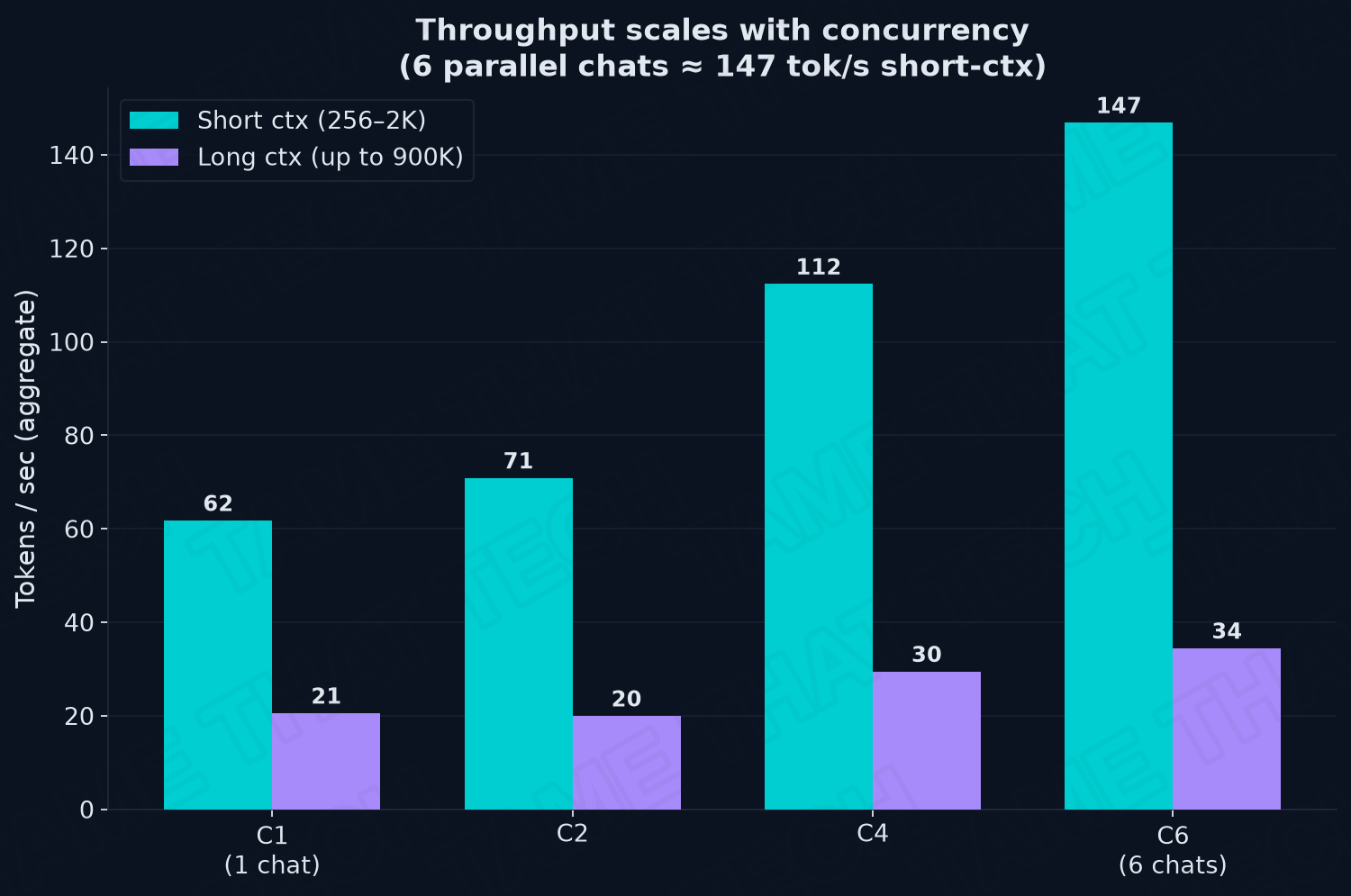
| Concurrency | Short ctx (256–2K) | Long ctx (up to 900K) |
|---|---|---|
| 1 chat | 62 tok/s | 21 tok/s |
| 2 chats | 71 tok/s | 20 tok/s |
| 4 chats | 112 tok/s | 30 tok/s |
| 6 chats | 147 tok/s | 34 tok/s |
A single stream writes at 60–83 tokens per second. For scale: an average adult reads around 250 words per minute, so this thing outruns your reading speed several times over. Push six people onto it simultaneously and aggregate throughput climbs to 147 tok/s on short context — six concurrent conversations with nobody waiting.
Speculative decoding
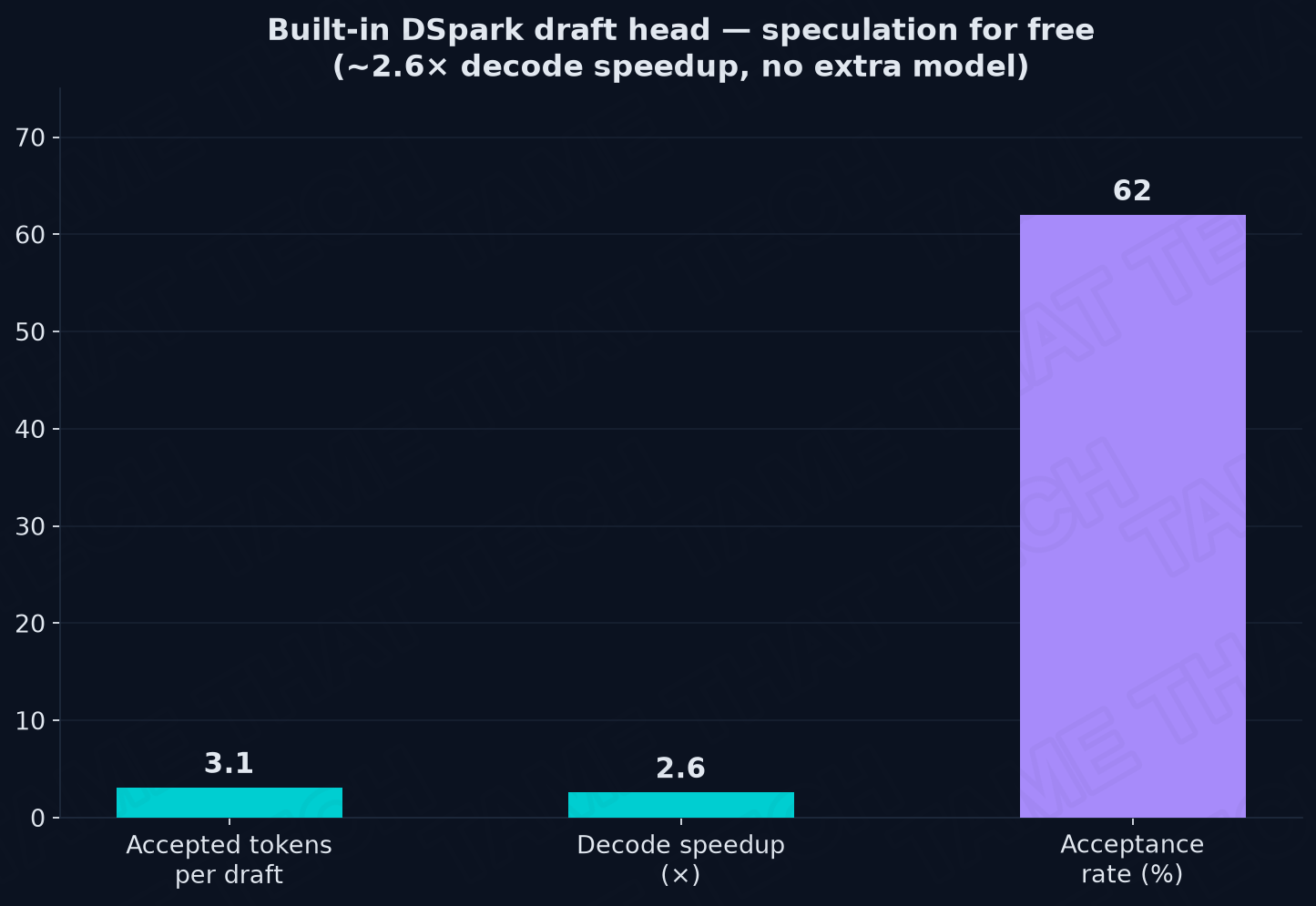
A big part of that decode speed is speculative decoding, and DeepSeek’s implementation is unusually elegant: the draft head is built into the model itself. No secondary draft model, no extra memory allocated to a second network.
- 3.1 accepted tokens per draft step
- 2.6× effective decode speedup
- 62% acceptance rate
The 1M context, honestly
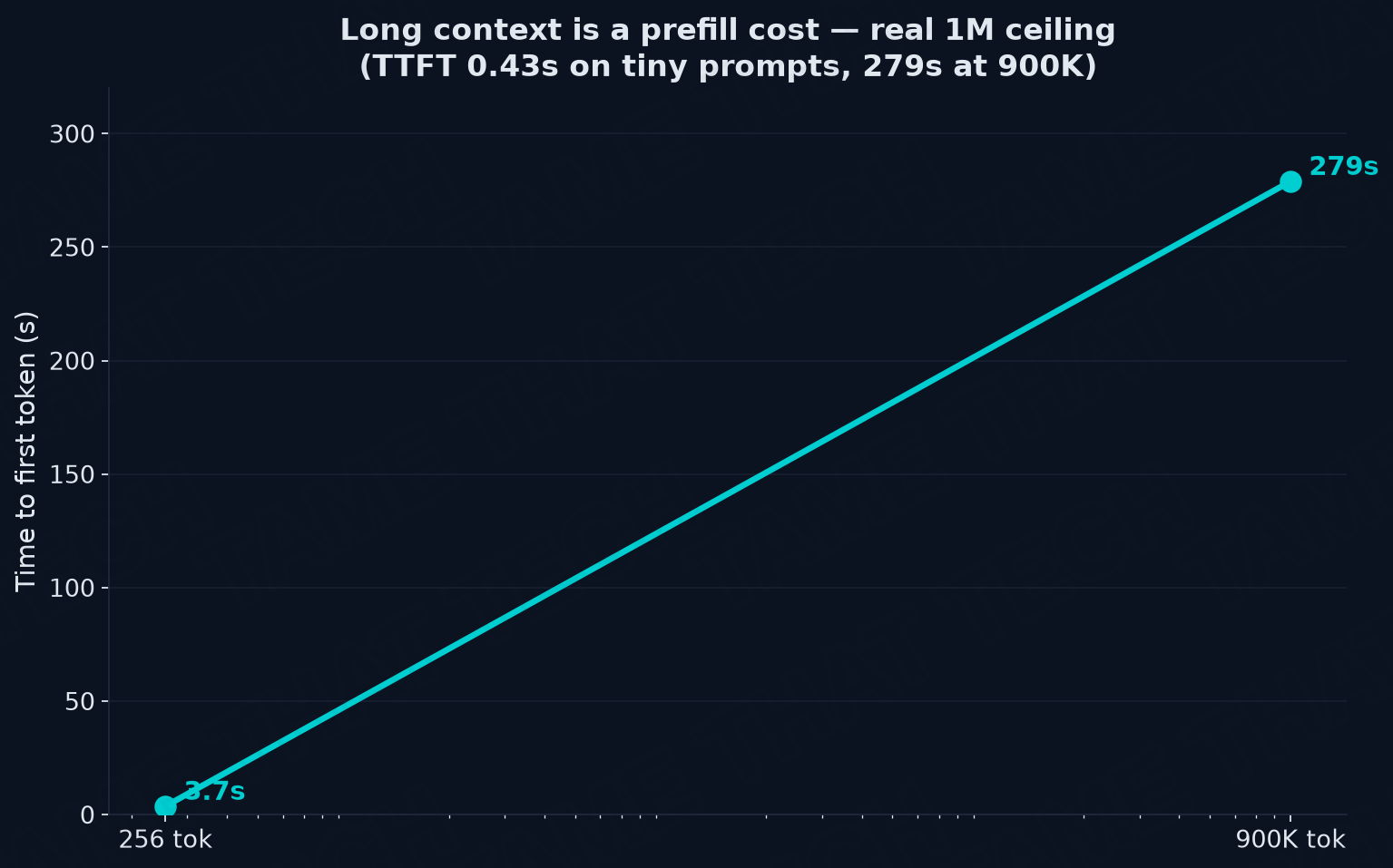
| Prompt length | Time to first token | Generation speed |
|---|---|---|
| 256 tokens | 3.7 s | 20–34 tok/s |
| 900K tokens | 279 s | 20–34 tok/s |
The bigger the stack you hand it, the longer it reads before it writes — that’s pure prefill compute, not a stall. A tiny note takes about four seconds to start answering. A 900,000-token document takes roughly four and a half minutes just to read and organise. Once it’s done reading, it writes steadily and it does not crash.
Reliability
- 14 / 14 capability test suites passed
- 1,015 consecutive inference requests over a 30-minute soak test
- 0 errors
Versus a gaming GPU
Think of a gaming card as a sporty two-seater: it sprints beautifully with a small load, and the moment you hand it something big — a modern enterprise model needing 65GB — a 32GB card can’t even start the engine. A 128GB card will beat this cluster on raw memory bandwidth every time (273 GB/s is roughly an order of magnitude below datacentre HBM). But the dual-GX10 is the cargo truck. It won’t win a drag race, and it will haul an entire model that simply does not fit in the sports car.
That’s the real trade: capacity over throughput. Total memory addressability beats peak bandwidth for models this large.
Thermals, Power & Noise
Putting enterprise-tier compute in a mini desktop chassis usually means screaming fans. Not here.
| Condition | Measured |
|---|---|
| Idle temperature | ~44°C |
| Idle power draw | ~43 W per unit |
| Single-node sustained load | 165–185 W total, 190 W absolute peak |
| GPU load during soak | 94–96% |
| Chip temperature under load | 74–75°C |
Two boxes running a trillion-parameter model idle on about the same power as a few bright light bulbs. Throughout an extended 30-minute benchmark soak with both GPUs pinned at 94–96%, chip temperatures levelled off at a calm 74–75°C.
From a metre away the fans are practically inaudible — a gentle hum that disappears behind normal room acoustics. That’s a genuinely rare result for this class of hardware.
Buy It or Rent It? The Cost Math
| Approach | Cost | When it wins |
|---|---|---|
| Two GX10 units + DAC cable | ~$8,000 + cable | You hammer tokens daily and the data must never leave your LAN |
| DeepSeek V4 Flash API | ~$0.14 / $0.28 per 1M tokens in/out | You’re bursty, or you just want to use the model |
| Cloud GPU rental | Hourly | Occasional heavy bursts without hardware commitment |
At API rates, eight thousand dollars of hardware is roughly three years of amortised token spend — and that only pencils out if you’re running it hard, every day. If you generate occasional prompts, renting stays cheaper, full stop.
The thing you can’t put in a spreadsheet is the other column: the data never leaves the LAN. Sensitive documents, homelab notes, client work — processed by a frontier-class model on your own metal, air-gapped from third-party servers. For some people that’s the entire purchase decision.
Price & Availability
Pricing on this machine is genuinely messy — configuration and channel both move the number a lot, so check before you buy.
| Configuration / Channel | Price observed | As of |
|---|---|---|
| ASUS U.S. starting price | $3,999 | Aug 2026 |
| Best Buy — 1TB (GX10-GG0010BN) | $3,999.99 | Sep 2026 |
| ASUS eShop — 2TB (GX10-GG0020BN) | $6,999 | Sep 2026 |
| NVIDIA Marketplace — 1TB | $5,999 (out of stock) | Sep 2026 |
| Amazon — 2TB | $6,199.99 | Sep 2026 |
Configurations: GX10-GG0010BN (1TB PCIe 4.0), GX10-GG0016BN (2TB PCIe 4.0), GX10-GG0020BN (4TB PCIe 5.0).
⚠️ Two buying notes. ASUS describes the GX10 as a specialised appliance: all sales are final, and there are no returns once the order is processed — defective units go through warranty repair or replacement instead. And ASUS does not always present storage consistently across listing pages, so confirm the exact SKU rather than assuming a given price includes 4TB.
And budget for the cable. A passive QSFP direct-attach copper cable is the cheapest part of the whole build, but it’s mandatory for the cluster story — you cannot do this over the 10GbE jack.
Pros and Cons
Pros
- Massive memory addressability — 128GB of unified LPDDR5x per box runs models no consumer GPU can even load
- Exceptional dual-200GbE ConnectX-7 clustering over a cheap passive copper cable, no switch required
- Outstanding efficiency and acoustics — under 45W clustered per node, virtually silent from a metre away
- Complete data sovereignty — frontier-scale inference that never touches a third-party server
- 1M-token context ceiling with a 2.53M-token pool across the pair
Cons
- The first-boot network permission trap can lock you out of headless SSH until you fix it manually
- No USB-A ports, no analogue audio, no microSD — peripheral convenience is essentially zero
- 273 GB/s memory bandwidth makes dense models run far slower than MoE architectures, and far slower than an HBM GPU
- Not plug-and-play: 167GB per node to download, and NCCL will bite you if the fabric wiring drifts
- Price varies wildly by SKU and seller, and sales are final
The Bottom Line
The ASUS Ascent GX10 is a rare, boundary-pushing piece of hardware. It is emphatically not for someone who wants a five-minute plug-and-play desktop assistant — buy one of the mini PCs we’ve reviewed instead and save thousands. This is purpose-built for homelab architects, developers, and security-conscious researchers who want to own their intelligence pipeline outright.
If you generate occasional prompts, rent the API tokens. But if you process millions of tokens a month and need an environment where sensitive documents never touch someone else’s server, two GX10s linked by a single cable deliver something that simply didn’t exist on a desktop before.
Two boxes, one cable, an afternoon — and a frontier model that runs in your own rack, in all its glory.
Test units purchased at retail by Tame That Tech. Two ASUS Ascent GX10 units, clustered via ConnectX-7 RoCE fabric, running DeepSeek V4 Flash with vLLM TP=2. Benchmarks collected over a multi-day live cluster run.
— Tame That Tech Minion
Discussion