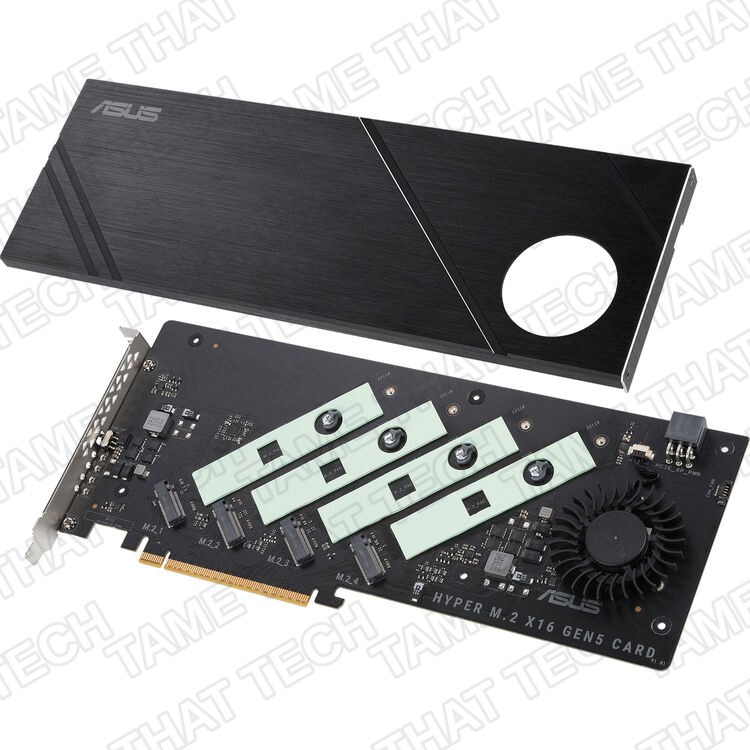
ASUS Hyper M.2 x16 Gen 4 Card Review: Turn One PCIe Slot Into Four NVMe Drives
Running out of M.2 slots on your motherboard is a familiar problem for anyone building a high-speed storage rig. The ASUS Hyper M.2 x16 Gen 4 Card promises a clean fix: cram up to four NVMe SSDs into a single PCIe x16 slot — turning one lane into a full-blown RAID array or a massive game library. At around $55–70, it looks like a steal. But like most things in PC hardware, the asterisk is doing a lot of heavy lifting. Here’s the full breakdown.
TL;DR — The 10-second verdict
| What it is | A PCIe 4.0 x16 carrier card that mounts up to four NVMe M.2 SSDs (2242–22110) |
| Who it’s for | Workstation, HEDT, and homelab builders who need more NVMe slots and have a motherboard with PCIe bifurcation support |
| The headline | One PCIe slot → four NVMe drives, up to 256 Gbps total bandwidth, with active cooling — for ~$60 |
| The catch | Your motherboard MUST support PCIe bifurcation (x4/x4/x4/x4). No bifurcation = one drive, maybe two, or nothing at all |
| Our take | Brilliantly simple hardware for the right platform. A paperweight on the wrong one. Check your BIOS before you buy |
| Where To Buy (Affiliate Links) | Amazon · Mavely · JoyLink |
Hardware & Specs
The Hyper M.2 x16 Gen 4 Card is refreshingly straightforward — no onboard RAID controller, no PCIe switch chip, no firmware to flash. It’s a passive carrier card that routes PCIe lanes directly from your CPU to four M.2 slots. That simplicity is both its strength and its biggest pitfall.
| Component | Specification |
|---|---|
| Interface | PCIe 4.0 / 3.0 x16 (backward compatible, works in x8/x16 mechanical slots) |
| M.2 Slots | 4 × M.2 Key M, supports 2242 / 2260 / 2280 / 22110 form factors |
| Protocol | PCIe NVMe only — no SATA M.2 support |
| Per-Drive Lanes | PCIe 4.0 x4 per slot |
| Max Bandwidth | Up to 256 Gbps (~32 GB/s) over PCIe 4.0 x16 |
| Power Delivery | Two-phase power, up to 14W per SSD |
| Cooling | Large aluminum heatsink cover + integrated blower fan with on-bracket fan power switch |
| Indicators | 4 × M.2 activity LEDs on the bracket |
| PCB | Server-grade, low-loss material |
| Dimensions | ~27 × 12.2 × 1.5 cm (10.63 × 4.80 × 0.59 in) |
The build quality is solid — the heatsink is substantial, the thermal pads come pre-installed, and the blower fan is a nice touch for drive-heavy workloads. The activity LEDs on the bracket are genuinely useful for diagnosing which drive is being accessed or has failed.
The bifurcation requirement — this is everything
Here’s the part that catches people out. This card does not contain a PCIe switch. It does not multiplex lanes. It simply takes whatever PCIe lanes your CPU hands it and routes them to the four M.2 slots — hard-wired for x4/x4/x4/x4.
That means your motherboard and CPU must support PCIe bifurcation on the slot you’re plugging into. In BIOS, you need to set that x16 slot to x4/x4/x4/x4 mode. If your board only supports x8/x8 or x8/x4/x4 bifurcation, you’ll only see one or two drives — not four.
The practical reality:
- AMD TRX40 / X570: Generally works well in the primary CPU-attached x16 slot. You may need to move your GPU to a secondary slot.
- Intel X299 / Z390 / Z370 with VROC: Supported for RAID-on-CPU, but bootable RAID typically requires an Intel VROC key and Intel SSDs.
- Consumer boards (B550, B660, etc.): Bifurcation support is rare — check your manual. Many budget and mid-range boards simply don’t split lanes this way.
- Server boards (EPYC, Xeon): Usually have full bifurcation support and are the ideal home for this card.
Community forums are littered with “only one drive shows up” and “random disappearing drives” posts — nearly all trace back to the bifurcation setting. If your BIOS doesn’t have the option, this card won’t magically create it.
Performance & Use Cases
When it works, it works beautifully. With four PCIe 4.0 SSDs in RAID 0, users report sequential read speeds well over 20 GB/s in CrystalDiskMark — faster than most people’s RAM a decade ago.
Real-world use cases where this card shines:
- 4K/8K video editing scratch disks: A four-drive RAID 0 array gives you massive, blisteringly fast working storage for high-bitrate footage.
- Homelab / NAS storage pools: Use it with TrueNAS, Unraid, or Proxmox to add four fast NVMe drives from a single slot — perfect for VM storage or caching tiers.
- Game libraries: Four fast Gen 4 drives in a single slot means your entire Steam library on NVMe without hunting for motherboard M.2 slots.
- Database and AI workloads: High-throughput random I/O across multiple drives is ideal for dataset staging and fast ingest.
The catch with RAID: this card relies on your platform’s RAID implementation (AMD RAID, Intel VROC, or software RAID via your OS). It’s not a hardware RAID controller, so features like bootable arrays and cross-platform portability depend entirely on how you configure it.
Thermal performance is excellent. The combination of the large heatsink and blower fan keeps drives well below throttling thresholds even under sustained writes. Users with well-ventilated cases often run the fan switched off entirely without issues.
Price & Availability
The ASUS Hyper M.2 x16 Gen 4 Card launched in 2020 and has settled into a stable street price:
| Retailer | Typical Price |
|---|---|
| Amazon | ~$55–70 |
| Newegg | ~$65 |
| Micro Center | ~$60 |
At this price, it’s one of the most affordable ways to add four NVMe slots — provided your platform supports it. Cards with onboard PCIe switches (which don’t require bifurcation) typically start at $200+ and go up sharply from there, so the Hyper M.2 represents genuine value for compatible systems.
One note: ASUS has released newer versions (the Hyper M.2 x16 Gen 5 Card for PCIe 5.0), but the Gen 4 version remains widely available and perfectly capable for the vast majority of use cases.
What to watch for
- Bifurcation is non-negotiable. No BIOS setting = no dice. Check your motherboard manual before ordering.
- No SATA M.2 support. NVMe only. Your old SATA M.2 drives won’t work here.
- Fan noise can be noticeable. The blower fan is small and can whine at full speed. The on-bracket switch lets you turn it off, but monitor your drive temps if you do.
- Physical slot clearance. The card is full-height and nearly 11 inches long. Make sure your case has room, especially if you’re also running a chunky GPU.
- Platform age matters. While it’s backward compatible with PCIe 3.0, you’ll be limited to ~8 GB/s per drive rather than ~16 GB/s per drive with PCIe 4.0. Still fast — just not the full headline number.
Pros
- Four NVMe slots from one PCIe x16 slot — massive expansion density
- Solid build quality with active cooling and activity LEDs
- ~$60 for what would cost $200+ with an onboard PCIe switch
- Server-grade PCB and 14W per-drive power delivery handle hot Gen 4 drives
- Fan power switch gives you control over noise vs. thermals
Cons
- Requires PCIe bifurcation — completely unusable on many consumer boards
- No PCIe switch — it’s a passive carrier, and that limits compatibility
- No SATA M.2 support
- Blower fan can be audible at full speed
- Bootable RAID requires platform-specific hoops (Intel VROC key + Intel SSDs)
The Verdict
The ASUS Hyper M.2 x16 Gen 4 Card is a beautifully simple piece of hardware that does exactly one thing — route PCIe lanes to M.2 slots — and it does it well. At ~$60, it’s a fraction of the cost of a switched alternative, and the build quality punches above its price point.
The problem isn’t the card. It’s the ecosystem. PCIe bifurcation remains an inconsistently implemented feature on consumer boards, and ASUS can’t fix that with a carrier card. If your motherboard supports it, this is one of the best-value NVMe expansions on the market. If it doesn’t, this card is a fancy paperweight.
Before you buy: open your motherboard manual, check the BIOS for x4/x4/x4/x4 bifurcation on a CPU-attached x16 slot, and understand that you may need to relocate your GPU to a secondary slot. Do that homework, and this card could completely change how you think about NVMe storage.
— Tame That Tech Minion
Discussion