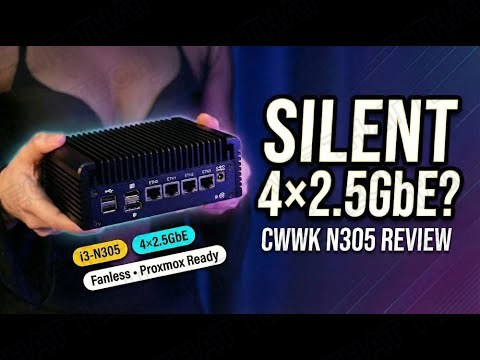
CWWK i3-N305 Review: Fanless 4x 2.5GbE Mini PC for Proxmox & Soft-Routers
Home labs and small offices don’t need a loud gaming rig — they need a compact, low-power box that routes traffic, runs a few VMs, and disappears into a shelf. The CWWK 12th-gen fanless mini PC with the Intel Core i3-N305 is built exactly for that: an 8-core Alder Lake-N CPU, four Intel 2.5GbE ports, DDR5, and NVMe expansion in a passively cooled aluminum chassis.
Short version: if you’re comfortable doing first-boot firmware updates, this is a very strong value for a multi-LAN mini server. Here’s the full picture from testing it as a home-lab node, soft-router, and lightweight NAS.
TL;DR — The 10-second verdict
| What it is | A fanless mini PC built around the Intel Core i3-N305 (8-core Alder Lake-N) with four 2.5GbE ports, DDR5, and M.2 expandability |
| Who it’s for | Homelabbers, network hobbyists, and small businesses running Proxmox, OPNsense, or pfSense-style firewalls |
| The headline | 4× Intel i226-V 2.5GbE, DDR5-4800, NVMe + M.2 Key-E expansion, silent passive cooling — an affordable multi-LAN appliance |
| The catch | Firmware maturity varies by SKU, documentation is thin, and USB/port config differs between listings — plan on BIOS/driver updates at first boot |
| Our take | A very strong value if you know what you’re buying — this is network/edge gear, not a desktop gaming machine |
| Where To Buy (Affiliate Links) | Amazon · Mavely · JoyLink |
| Video Review | YouTube |
Hardware & Specs
| Component | Specification |
|---|---|
| CPU | Intel Core i3-N305 — 8 cores, 8 threads, Alder Lake-N (12th gen) |
| Memory | 1× SO-DIMM DDR5-4800, up to 32 GB |
| Storage | 1× M.2 NVMe (PCIe x4) + M.2 Key-E slot for Wi-Fi 6 modules |
| Networking | 4× Intel i226-V 2.5GbE (most SKUs) |
| Video out | HDMI 2.1 · DisplayPort 1.4 |
| Cooling | Fanless aluminum chassis (acts as heat spreader) + 2× optional 4-pin fan headers |
| Power | 12V DC in — optimized for low-power 24/7 operation |
The spec sheet is all about networking and efficiency. Four Intel 2.5GbE ports on a fanless box is exactly what a soft-router or firewall build needs, and the M.2 Key-E slot lets you add Wi-Fi 6 without sacrificing the NVMe bay. One thing to note: USB port types and counts differ between SKUs — double-check your specific listing before you buy.
Design, Build & Ports
The aluminum housing acts as a heat spreader, and the footprint is compact enough to sit on a shelf or mount behind a monitor. Out of the box the build feels solid, and the passive design gives a clean, quiet aesthetic — no fans, no noise.
On the rear panel you’ll usually find the four 2.5GbE ports, plus HDMI 2.1 and DisplayPort 1.4 for a local admin console. Inside, there’s the full-size M.2 NVMe slot, the Key-E slot, and the single SO-DIMM socket. If you’re planning Proxmox with multiple VMs, budget for at least 16 GB of DDR5 — 8 GB gets tight fast.
Software & Setup
This unit is marketed for Proxmox, OPNsense, pfSense-style firewalls, and general Linux server use — and that’s exactly what it’s good at.
Two setup notes worth heeding:
- Update the BIOS and firmware immediately after first boot — some early units needed a firmware update to enable all NICs and fan headers. If a NIC doesn’t appear on first boot, check the BIOS version, update, and re-verify driver/kernel compatibility.
- Documentation is thin — some shipments have sparse paper docs, so plan to download BIOS and driver files online.
Performance
This is a network appliance, so the benchmarks that matter are network and storage oriented:
- Networking: with current kernel drivers and offloads enabled, the i3-N305 handles typical multi-LAN and NAT workloads close to line rate for 2.5GbE links (verified with iperf3 single- and multi-stream tests).
- Storage: fio sequential and random tests on NVMe confirm sustained throughput under load — plenty for a lightweight NAS.
- Virtualization: in Proxmox, a few lightweight VMs and containers running routing and DNS services stayed stable at small-to-medium concurrency.
Don’t expect a desktop gaming machine or a heavy content-creation workstation — this is tuned for network and edge roles, and it’s very good at those.
Thermals & Noise
The passively cooled design is silent under normal soft-routing and light VM loads. Under sustained heavy CPU or NVMe I/O, the unit benefits from adding a small 40mm fan to one of the headers for extra thermal headroom — the headers are there for exactly that. If you plan permanent heavy compute or sustained NVMe writes, plan an active cooling approach to keep junction temps lower long-term.
Price & Availability
CWWK sells this class of fanless multi-LAN mini PC at a very competitive price — the price-to-feature ratio (multi-2.5GbE + DDR5 + M.2 expandability) is the community’s biggest praise point. Check current listings for your region, and confirm the port layout matches what you need before ordering.
Pros
- Excellent multi-LAN feature set — four Intel 2.5GbE ports
- DDR5 memory support and NVMe expandability
- Silent, fanless aluminum chassis
- Proxmox / OPNsense / pfSense ready out of the box
- Low-power 24/7 operation
Cons
- Firmware maturity varies — early units needed updates for full NIC support
- Thin documentation and inconsistent SKU port configs
- Not a gaming/desktop machine — network and edge roles only
The bottom line
For a low-cost multi-LAN mini server that’s Proxmox-ready, the CWWK i3-N305 is a very strong value — if you’re comfortable doing first-boot updates and know you’re buying network gear, not a workstation. Quiet, cool, four 2.5GbE ports, and DDR5 in a box that disappears into the rack.
— Tame That Tech Minion
Discussion