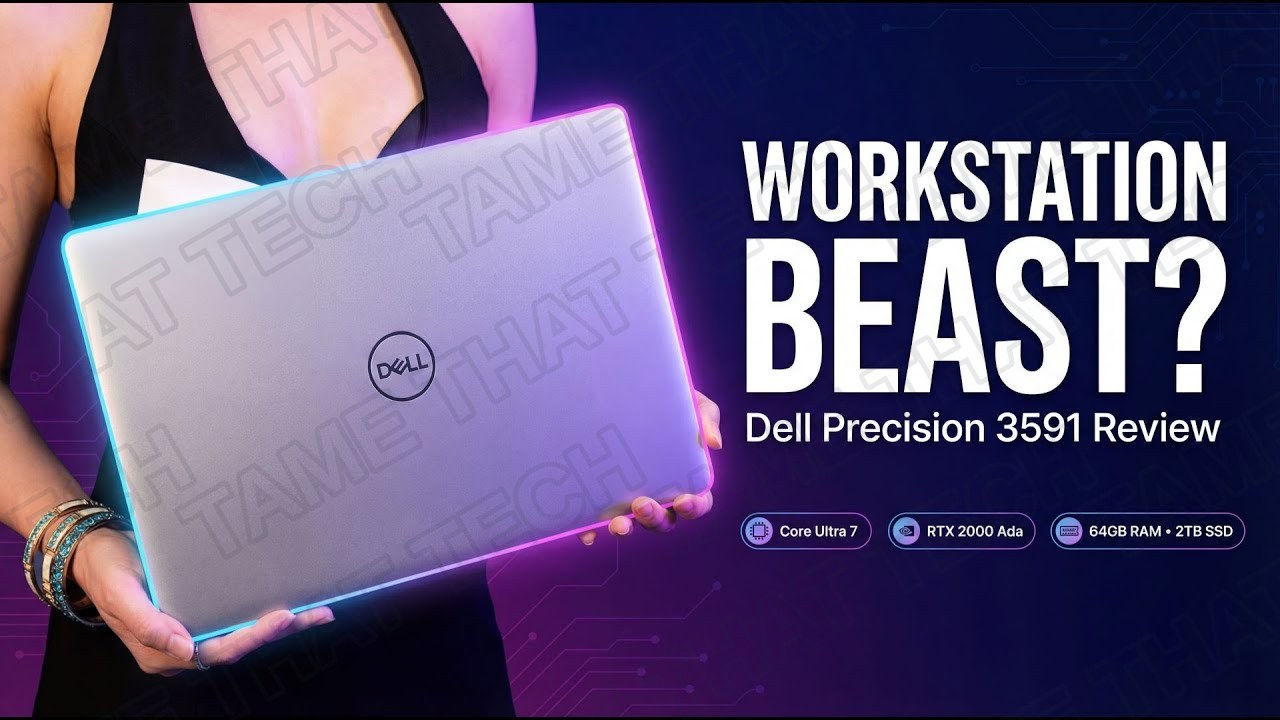
Dell Precision 3591 Review: Core Ultra 7 + RTX 2000 Ada — Better Than a Gaming Laptop?
This is the Dell Precision 3591 — a so-called “entry level” mobile workstation packing Intel’s new Core Ultra 7, NVIDIA’s RTX 2000 Ada, 64 gigabytes of RAM, and a 2 terabyte Gen 4 SSD. On paper it looks like a beast for engineers, 3D artists, developers, and creators. Today we’re going to see what this machine can really do, and whether you should buy this instead of a gaming laptop or a higher-end Precision.
Short version: it’s a serious, ISV-certified workstation in a portable 15-inch chassis — with one display-related trade-off you need to know about before you click buy.
TL;DR — The 10-second verdict
| What it is | Dell’s 15.6” entry mobile workstation: Intel Core Ultra 7 165H + NVIDIA RTX 2000 Ada + 64 GB DDR5-5600 + 2 TB Gen4 NVMe |
| Who it’s for | Engineers (CAD/BIM), 3D artists, developers/DevOps, and IT buyers who need a certified, supportable, upgradeable mobile workstation |
| The headline | Real pro GPU (RTX 2000 Ada, 8 GB) + 16-core Meteor Lake CPU + 64 GB RAM + Thunderbolt — genuine workstation power in a backpackable chassis |
| The catch | The base 1080p panel covers only ~66% sRGB (weak for color-critical work), no ECC memory, and it’s clearly audible under combined CPU+GPU load |
| Our take | A great buy for CAD/3D/dev work where stability and pro drivers matter more than peak gaming FPS — just budget for a good external monitor for color work |
| Where To Buy (Affiliate Links) | Amazon · Mavely · JoyLink |
| Video Review | YouTube |
Configuration & Positioning
The config we tested:
| Component | Specification |
|---|---|
| CPU | Intel Core Ultra 7 165H (Meteor Lake-H) — 16 cores / 22 threads, up to 5.0 GHz |
| GPU | NVIDIA RTX 2000 Ada Laptop — 8 GB GDDR6, 3072 CUDA cores, 24 RT cores, 96 Tensor cores |
| Memory | 64 GB DDR5-5600 (2× SO-DIMM) |
| Storage | 2 TB Samsung 980 Pro PCIe 4.0 NVMe + one free M.2 2280 slot |
| Display | 15.6” 1920×1080 16:9 IPS-class (BOE NV15T0C) |
| Networking | Intel Wi-Fi 6E AX211 · Bluetooth · 1GbE + 2.5GbE (Intel I225-LMvP) |
| Battery | ~97 Wh |
| Ports | 2× USB-C/Thunderbolt (DisplayPort + PD) · 2× USB-A · HDMI · 3.5mm audio · RJ-45 · SD/microSD card reader |
This isn’t a gaming toy — it’s an ISV-certified business workstation aimed at CAD, BIM, 3D, data, video, and heavy dev work, sitting below the bulkier Precision 5000 and 7000 series. Dell configures the Core Ultra 7 around 50 W sustained with short bursts up to 80 W, so heavy all-core workloads hold clocks without slamming into a wall.
Design, Build & Inputs
At first glance the 3591 looks like a classic Dell business machine — no RGB, no gamer angles, just a clean dark chassis with subtle Precision branding. Build quality is solid for a 15-inch workstation: minimal keyboard-deck flex, a firm hinge that still opens one-handed in some positions, and only a little lid twist if you really try. It feels like something you can throw in a backpack and bring on-site without babying it.
The keyboard is classic Dell business: full-size keys, comfortable travel, a sensible layout with no weird half-height arrows, and white backlighting for late nights. The trackpad is a Microsoft Precision unit — accurate tracking, gestures work as expected. You can also spec a fingerprint reader and IR camera for Windows Hello.
Ports & Connectivity
Connectivity is one of the reasons you buy a Precision instead of an ultrabook:
- 2× USB-C / Thunderbolt with DisplayPort and power delivery
- 2× USB-A for dongles, flash drives, and hardware keys
- Full-size HDMI, 3.5mm audio, and RJ-45 Ethernet (including the 2.5GbE Intel I225-LMvP)
- SD/microSD card reader (Genesys Logic) for camera workflows
- Wi-Fi 6E AX211 + Bluetooth for 6 GHz networks
This thing docks into a multi-display workstation setup with fast wired networking, then unplugs without a bag full of dongles.
Display — The Big Trade-Off
The panel is a 15.6” Full HD 1920×1080 display made by BOE (model NV15T0C). It’s fine for general office, dev, and CAD work — but it only covers about 66% of sRGB and under 50% of AdobeRGB and DCI-P3.
What that means in practice:
- For code, Excel, documents, remote desktops, and most CAD UIs — totally serviceable.
- For color-critical photo, video, and print work — not enough.
If your job lives in Photoshop, Lightroom, Resolve, or you deliver color-critical assets, you’ll want a higher-gamut panel option from Dell (where available) or a good calibrated external monitor. For the vast majority of engineering and dev workloads, resolution and sharpness are absolutely fine.
Gaming Performance
Settings: MEDIUM quality, FSR ON, no frame generation — the RTX 2000 Ada is roughly on par with a GeForce RTX 4050 Laptop in raw shading, tuned for pro stability.
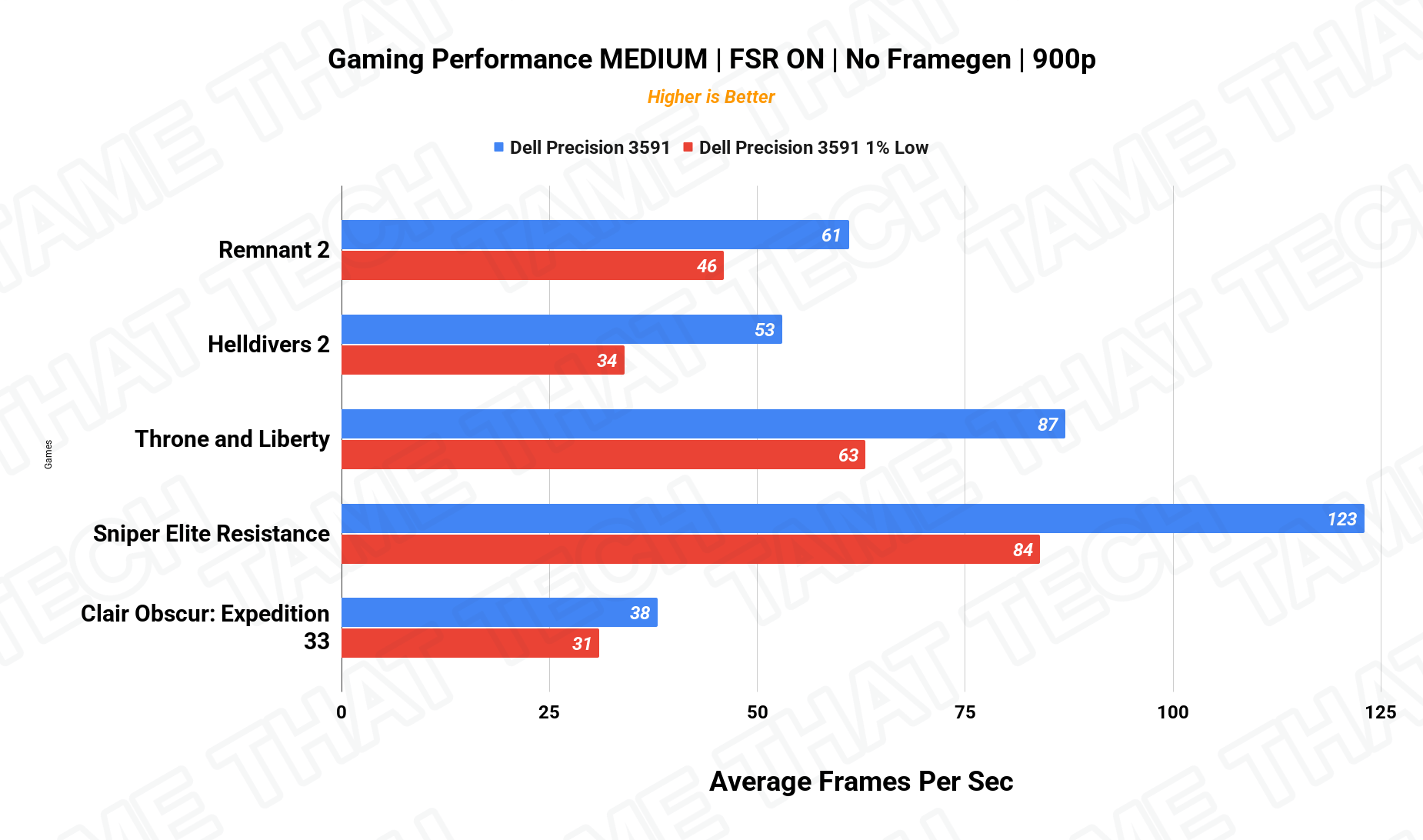
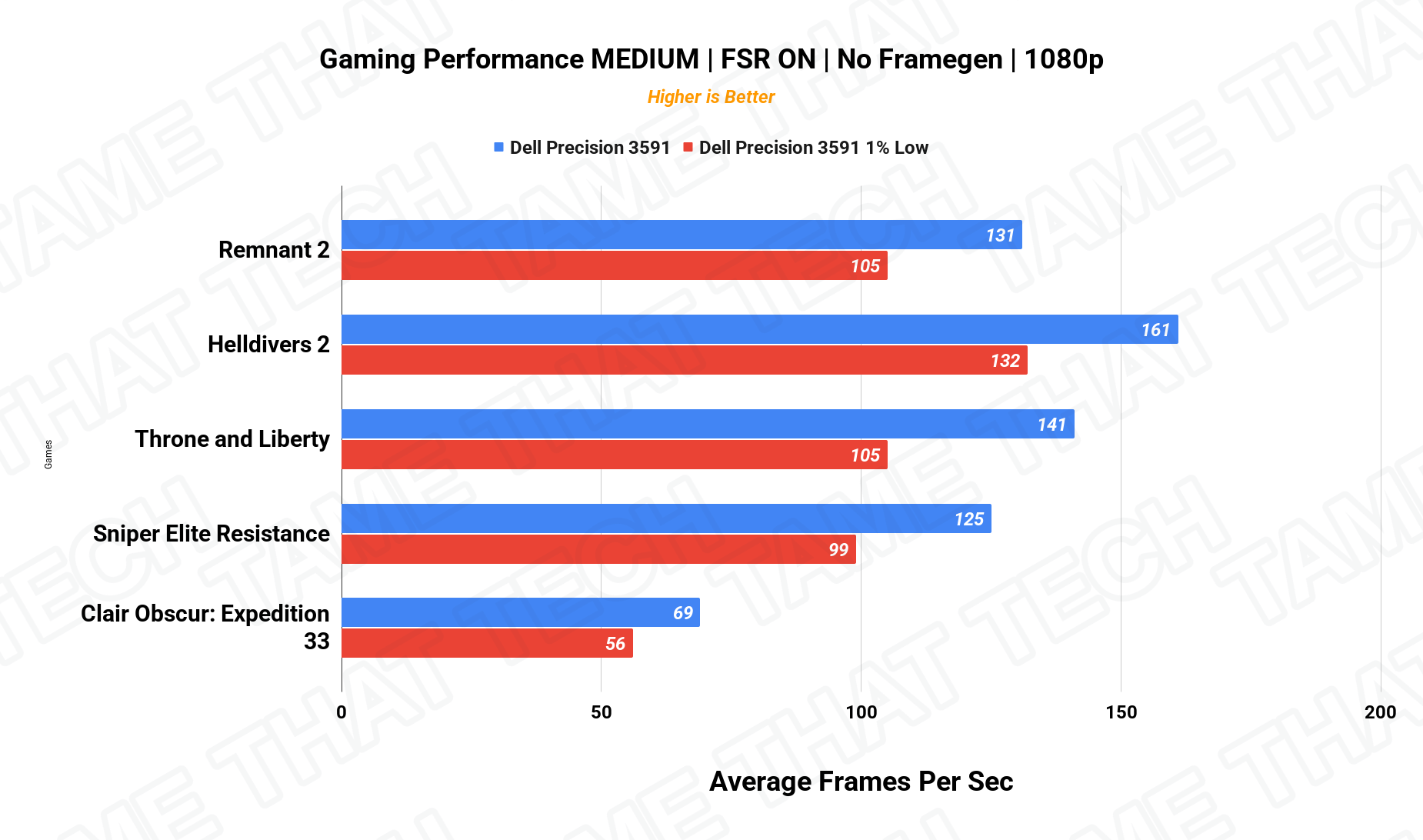
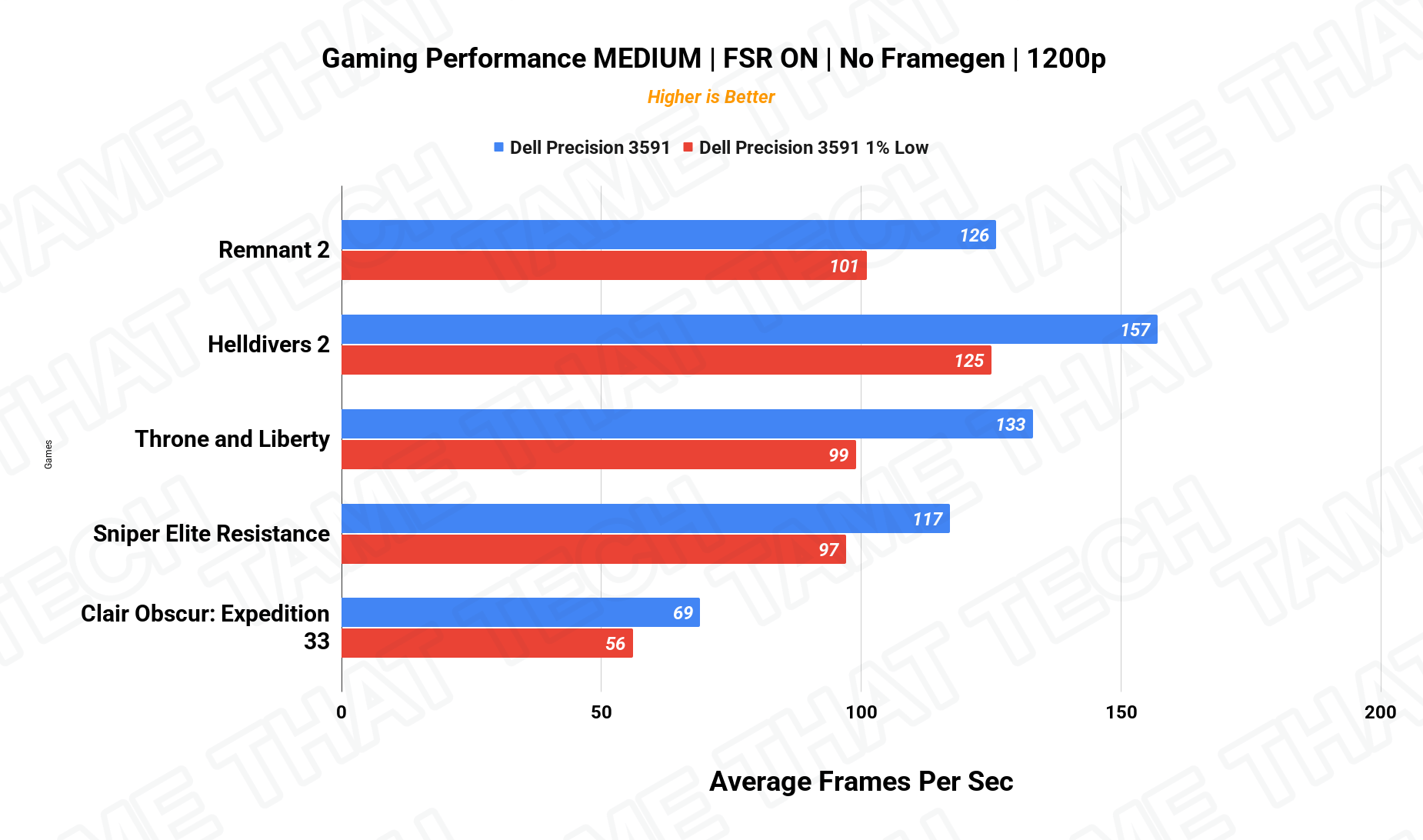
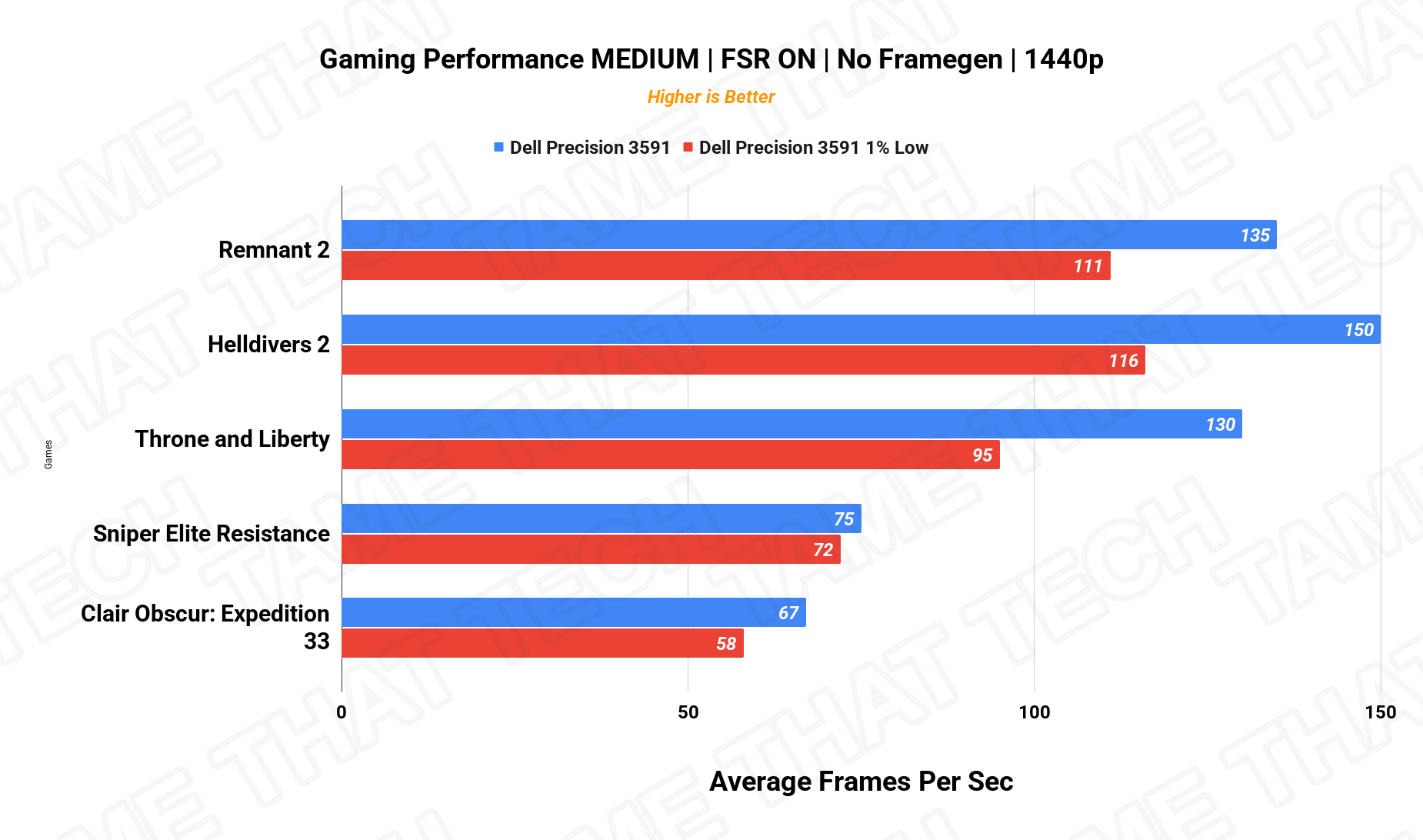
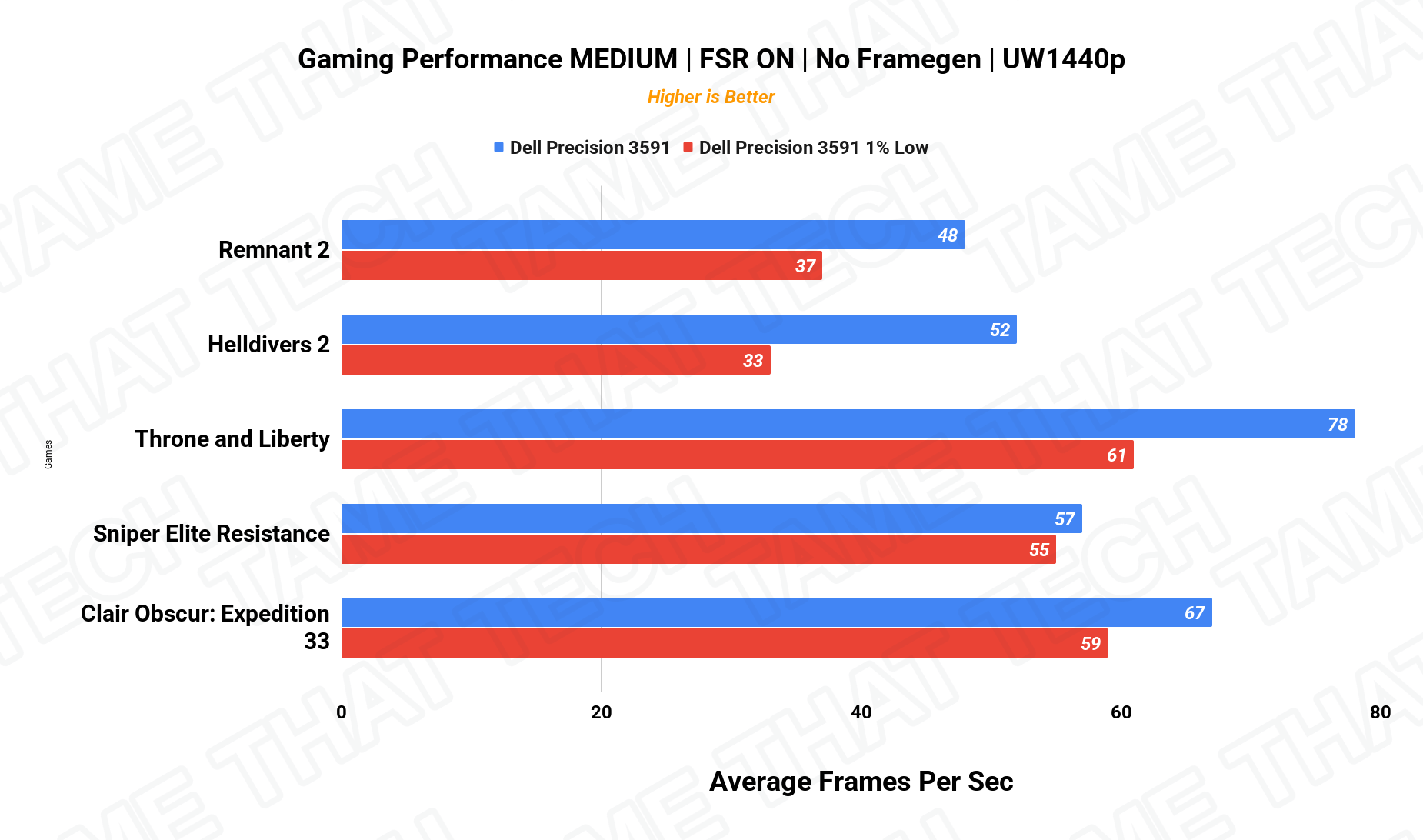
Yes — if you want to blow off steam after work, it’ll game fine at 1080p in most titles on medium to high settings. Just remember the drivers and thermals are tuned for stability and pro apps, not for squeezing every last frame out of Cyberpunk. Compared to a gaming laptop with a 4050/4060, you’re trading some peak FPS for ISV-certified drivers, pro features, and stability — usually a trade worth making if your income depends on CAD, 3D, or video.
Creator & Pro Workloads — DaVinci Resolve
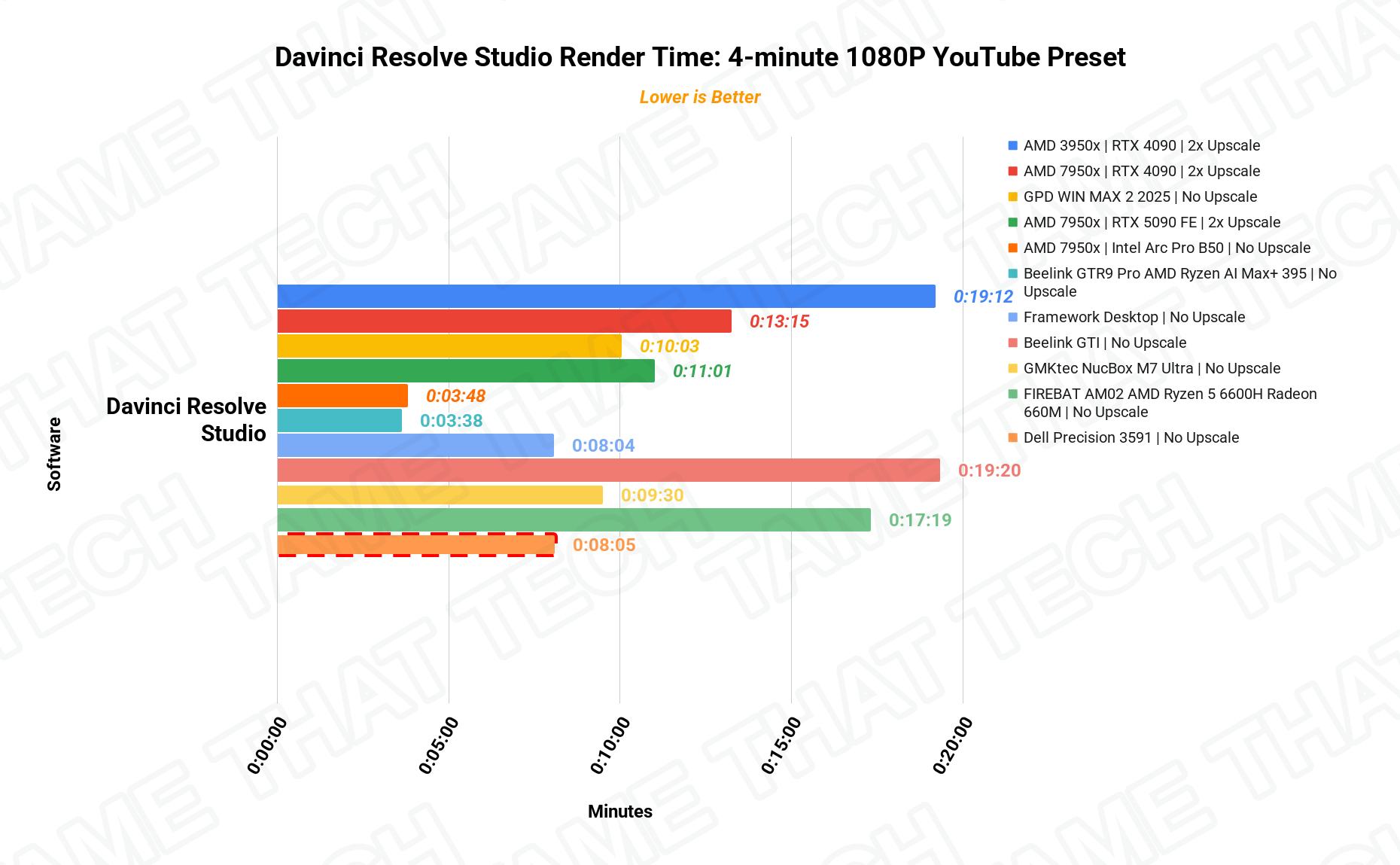
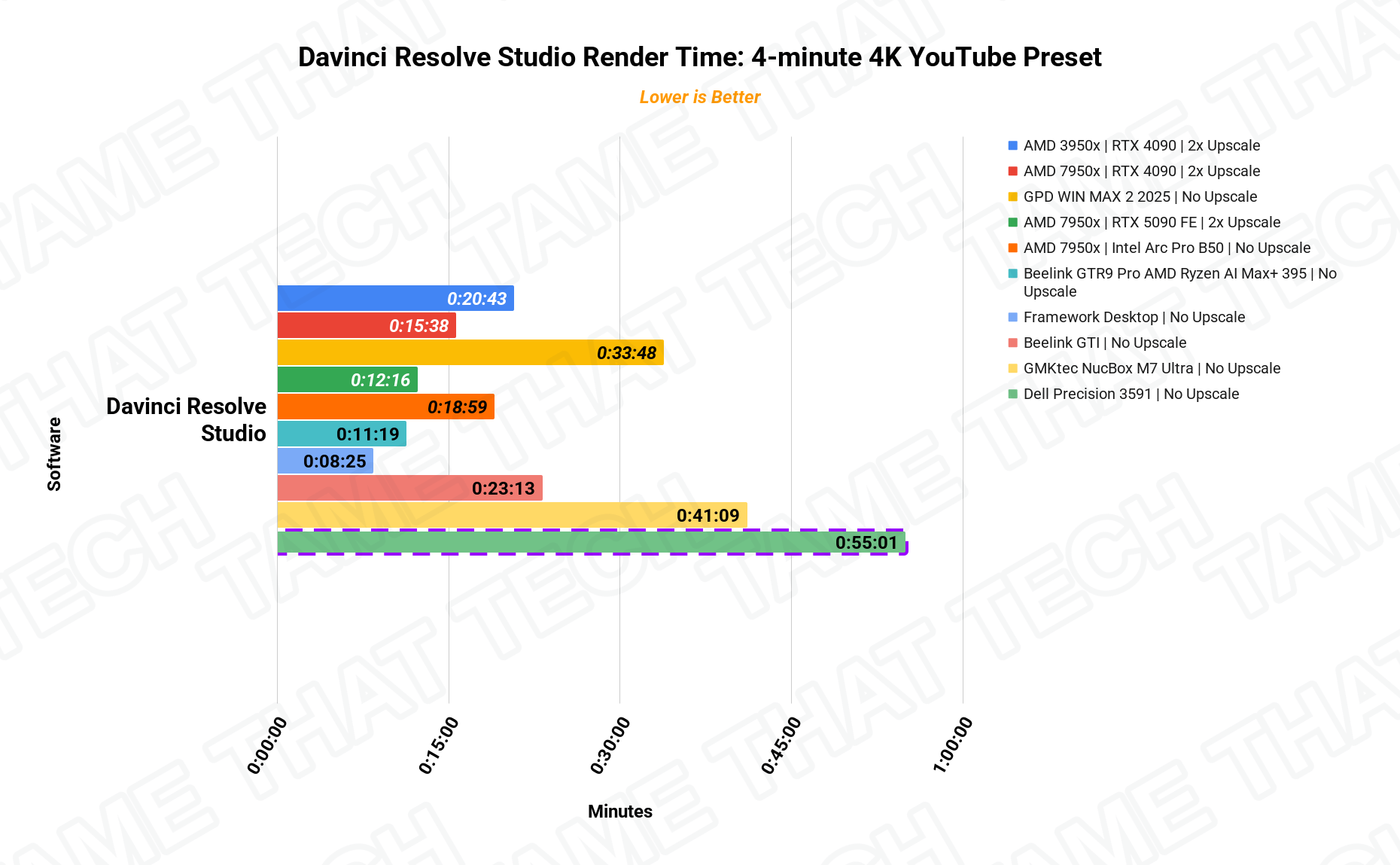
1080p timelines in Resolve feel very comfortable, and 4K with multiple effects is doable — especially leaning on ProRes/DNx intermediates and GPU-accelerated effects. The RTX 2000 Ada’s 8 GB of GDDR6 with CUDA and OptiX acceleration handles Blender look-dev, lighting, and previews directly on the laptop, and the included charts show exactly how the renders land.
Local AI — LLM Inference
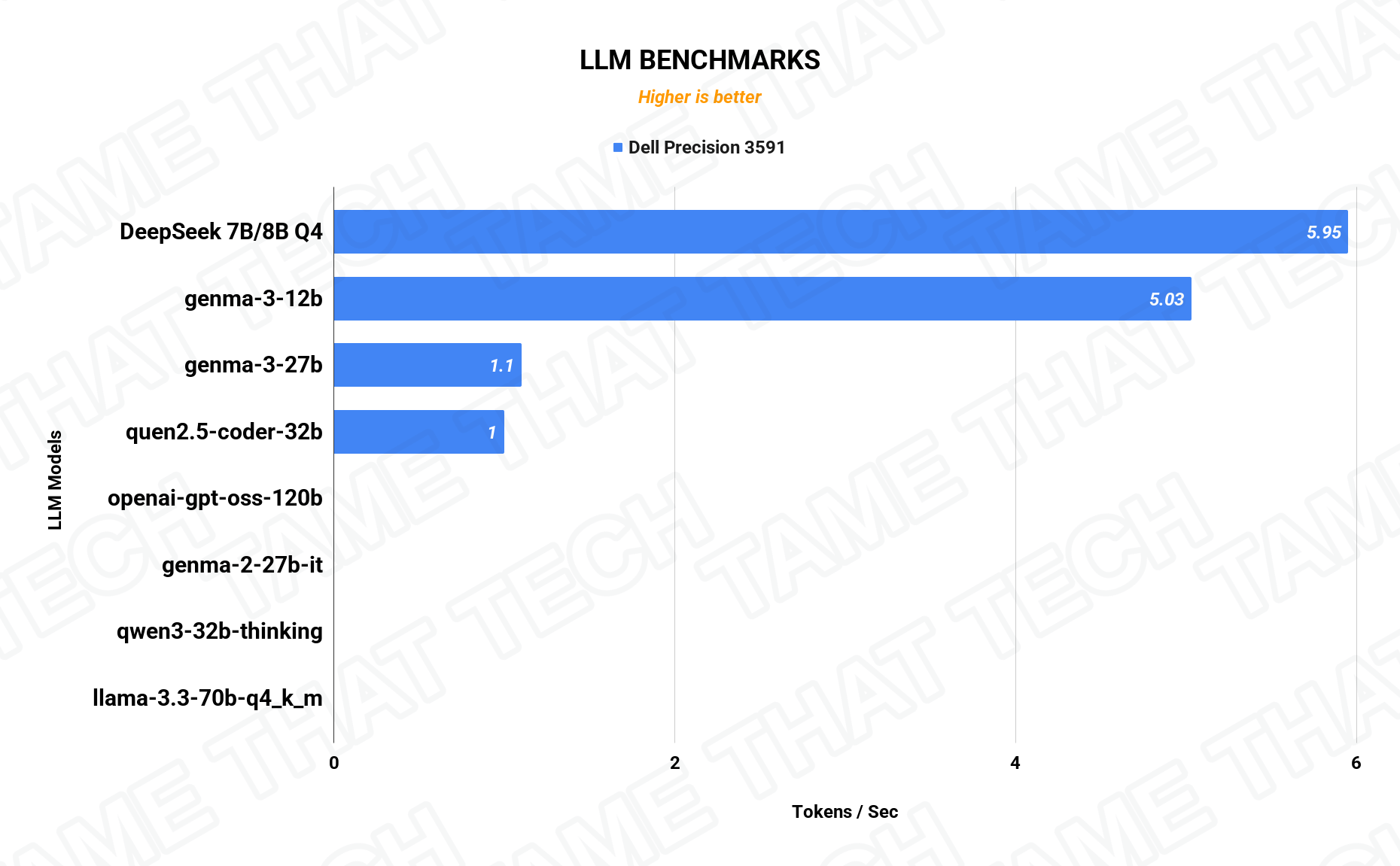
The Core Ultra 7 brings a dedicated NPU (Intel AI Boost) for always-on background tasks like Windows Studio Effects, blur, eye contact, and noise suppression — a nice efficiency win on battery. For heavier models — big local LLMs or production-scale Stable Diffusion — you lean on the RTX 2000 Ada and its 96 Tensor cores instead, and the 64 GB unified memory pool gives you serious headroom for AI/ML work.
Thermals, Noise & Battery
A thin 15-inch chassis with a 50 W CPU and a pro RTX GPU will never be silent under load. Under heavy CPU-only workloads the fan ramps to a clearly audible but not obnoxious whoosh; combined CPU+GPU rendering puts it firmly in “workstation mode” — not gaming-laptop-screaming, but you’ll hear it. Dell favors sustained performance and safe thermals over silence, which is the right priority for this class.
Battery life depends on usage: light workloads on integrated Arc graphics with medium brightness give several hours on the ~97 Wh pack; continuous 3D or CUDA work drops that to a few hours at best. This machine can work on battery when you need it, but long renders want the high-wattage Dell adapter.
Real-World Workflows
- CAD/BIM: medium-to-large SolidWorks or Revit assemblies handled smoothly; the RTX 2000 Ada gives responsive, high-detail viewports.
- 3D/VFX: Blender Cycles with CUDA or OptiX taps the RTX 2000 Ada for scene work directly on the laptop.
- Video: comfortable 1080p editing; doable 4K with GPU-accelerated effects.
- Dev/DevOps: with 64 GB, you can spin up multiple Docker containers or VMs, run your IDE, browser, database, and still have headroom. Dual NVMe layout is ideal for splitting OS and project drives.
Price & Availability
Precision pricing depends heavily on configuration and Dell’s frequent business discounts — this high-end config (Core Ultra 7 / RTX 2000 Ada / 64 GB / 2 TB) is a serious investment, but well under Precision 5000/7000 territory for most of the capability. Worth knowing:
- Display: budget for an external monitor if you do color-critical work.
- No ECC: as a 3000-series Precision, it uses standard DDR5 SO-DIMMs — fine for most engineering/dev/creative work, but ECC mandates point at the 5000/7000 series.
- Gaming comparison: a similarly priced 4060/4070 gaming laptop will beat it in raw FPS — you’re paying for pro drivers, stability, upgradeability, and Dell’s business support.
Pros
- Powerful Core Ultra 7 165H + RTX 2000 Ada combo for serious CPU and GPU workloads
- Up to 64 GB DDR5-5600 and dual PCIe 4.0 NVMe slots
- Excellent I/O: Thunderbolt, HDMI, USB-A, wired 2.5GbE, Wi-Fi 6E, card reader
- Large ~97 Wh battery for solid light-to-medium use on the go
- Business-class build, serviceability, TPM 2.0 / vPro-class options
Cons
- Base 1080p panel at ~66% sRGB is weak for color-critical work
- No ECC memory on the 3000-series chassis
- Clearly audible fan under combined CPU+GPU load
- Price looks high vs. consumer gaming laptops if you don’t value pro drivers/support
The bottom line
The Dell Precision 3591 in this configuration is a serious mobile workstation for engineers, 3D artists, and developers — ISV-certified drivers, genuine upgradeability, and enough CPU/GPU/RAM to chew through real work, in a portable 15-inch chassis. Buy it for the work, not the color grading — and if color matters, add a good external monitor. That’s the honest trade-off.
— Tame That Tech Minion
Discussion