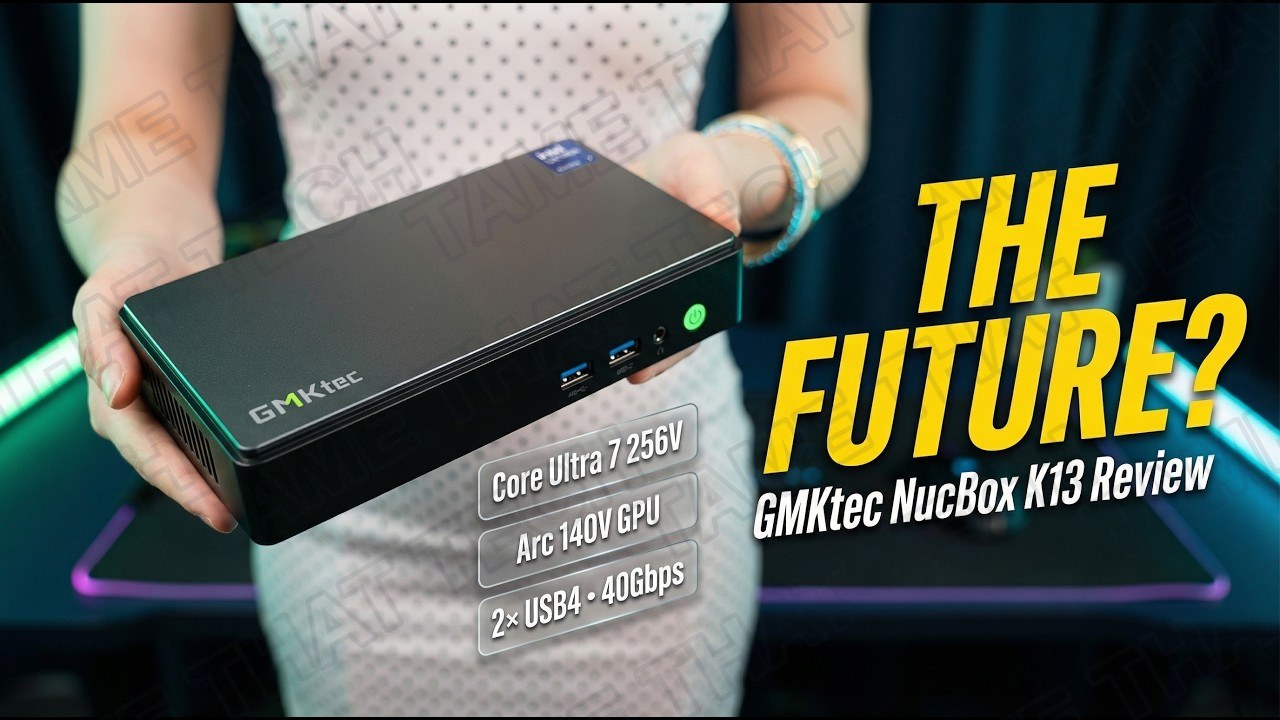
GMKtec NucBox K13 Review: Intel's Lunar Lake Mini PC Is Here (But There's a Catch)
Tiny PCs are going through a massive evolution. The GMKtec NucBox K13 is one of the very first ultra-compact machines to feature Intel’s highly anticipated Lunar Lake architecture — specifically the Core Ultra 7 256V — and it promises game-changing power efficiency, a massive leap in integrated graphics, and next-level AI performance. It also makes a highly controversial design choice that has the mini PC community completely divided.
Short version: this is a beautifully engineered, ultra-efficient little machine with fantastic integrated graphics — but the 16 GB of on-package memory is soldered to the CPU and can never, ever be upgraded. Here’s everything, measured.
TL;DR — The 10-second verdict
| What it is | An ultra-slim (33.2 mm) mini PC built around Intel Core Ultra 7 256V — Lunar Lake with Arc 140V integrated graphics |
| Who it’s for | Professionals who want a clean one-cable desk setup, homelab users craving 5GbE, and anyone who values efficiency over raw multi-core grunt |
| The headline | Intel’s newest architecture in a tiny box: Arc 140V gaming, 115 TOPS of AI, dual USB4, and a 5 GbE port — all at just 37 W max |
| The catch | 16 GB of RAM is baked onto the CPU package — no upgrades, ever — and the HDMI port is TMDS (effectively 2.0, capped at 4K60) |
| Our take | A uniquely engineered machine that’s perfect for some people and a hard no for others — the memory limit is the whole debate |
| Where To Buy (Affiliate Links) | Amazon · Mavely · JoyLink |
| Video Review | YouTube |
Hardware & Specs
| Component | Specification |
|---|---|
| CPU | Intel Core Ultra 7 256V — 8 cores, 8 threads, up to 4.8 GHz, Lunar Lake |
| GPU | Intel Arc 140V (Battlemage architecture) — integrated, with XeSS support |
| NPU | 47 TOPS dedicated · 115 TOPS total system AI performance |
| Memory | 16 GB LPDDR5X on-package, soldered — not upgradable |
| Storage | 2× M.2 2280 PCIe 4.0 slots — up to 16 TB total storage |
| Networking | 5 GbE Ethernet · Wi-Fi 6E · Bluetooth |
| Front I/O | 2× USB 3.2 Gen2 (10 Gbps) · 3.5 mm audio jack · power button |
| Rear I/O | 2× USB4 (40 Gbps, 100 W Power Delivery) · 5 GbE · HDMI 2.1 (TMDS) |
| Power | 120 W adapter · chip max draw ~37 W |
| Chassis | Ultra-slim docking-station-style design, just 33.2 mm tall |
The elephant in the room is the RAM. To achieve maximum efficiency, Intel baked 16 GB of LPDDR5X directly onto the CPU package. Because of this Memory-on-Package design, you cannot upgrade the RAM. Ever. If you’re a heavy multitasker or want to run large local AI models, that 16 GB hard limit is going to be a bottleneck — and it’s the single biggest complaint on Reddit right now.
Design & Build Quality
GMKtec has gone with a much slimmer, docking-station-style design this time around. At just 33.2 mm tall, you can easily tuck it right under your monitor without it being an eyesore. The chassis feels premium and purpose-built.
Accessing the internals is surprisingly easy: a single tiny screw and some magnets hold the bottom plate in place. Once inside, you’re greeted by two M.2 2280 PCIe 4.0 slots, meaning you can load this tiny footprint up with as much as 16 TB of fast storage.
Connectivity & I/O
The rear I/O is absolutely stellar. You get two full-function USB4 ports supporting 40 Gbps data transfer and 100 W Power Delivery — yes, if you have a compatible monitor, you can power this entire PC and send video over a single USB-C cable. There’s also an ultra-fast 5 GbE Ethernet port, a massive win for home server enthusiasts.
One quirk to note: the HDMI 2.1 port uses the TMDS standard, which means it’s effectively HDMI 2.0 — limiting you to 4K at 60 Hz rather than 120 Hz. If high-refresh 4K TV output matters, use the USB4 ports instead.
Thermals & Noise
High-performance chips in small boxes usually mean loud fans — thankfully, Lunar Lake is incredibly power-efficient, pulling a maximum of just 37 W. GMKtec paired this with dual copper heat pipes and a single turbine fan.
In our testing, the fan is practically silent during normal desktop workloads. Even when pushed to its limits during gaming, it emits a low, consistent hum that easily fades into the background.
Gaming Performance
Settings: LOW quality, XeSS ON, no frame generation — the new Arc 140V is a massive step up from previous Intel integrated graphics.
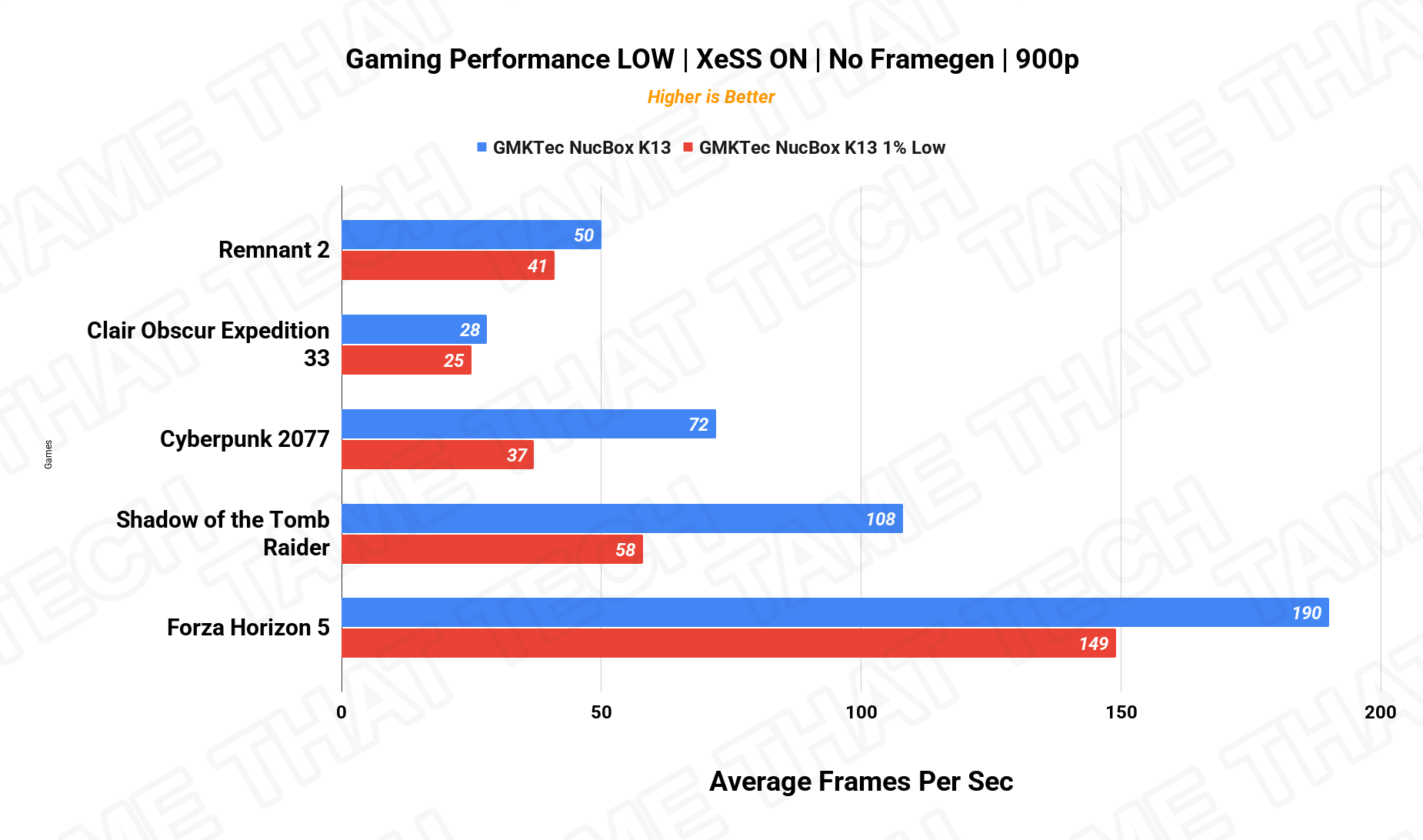
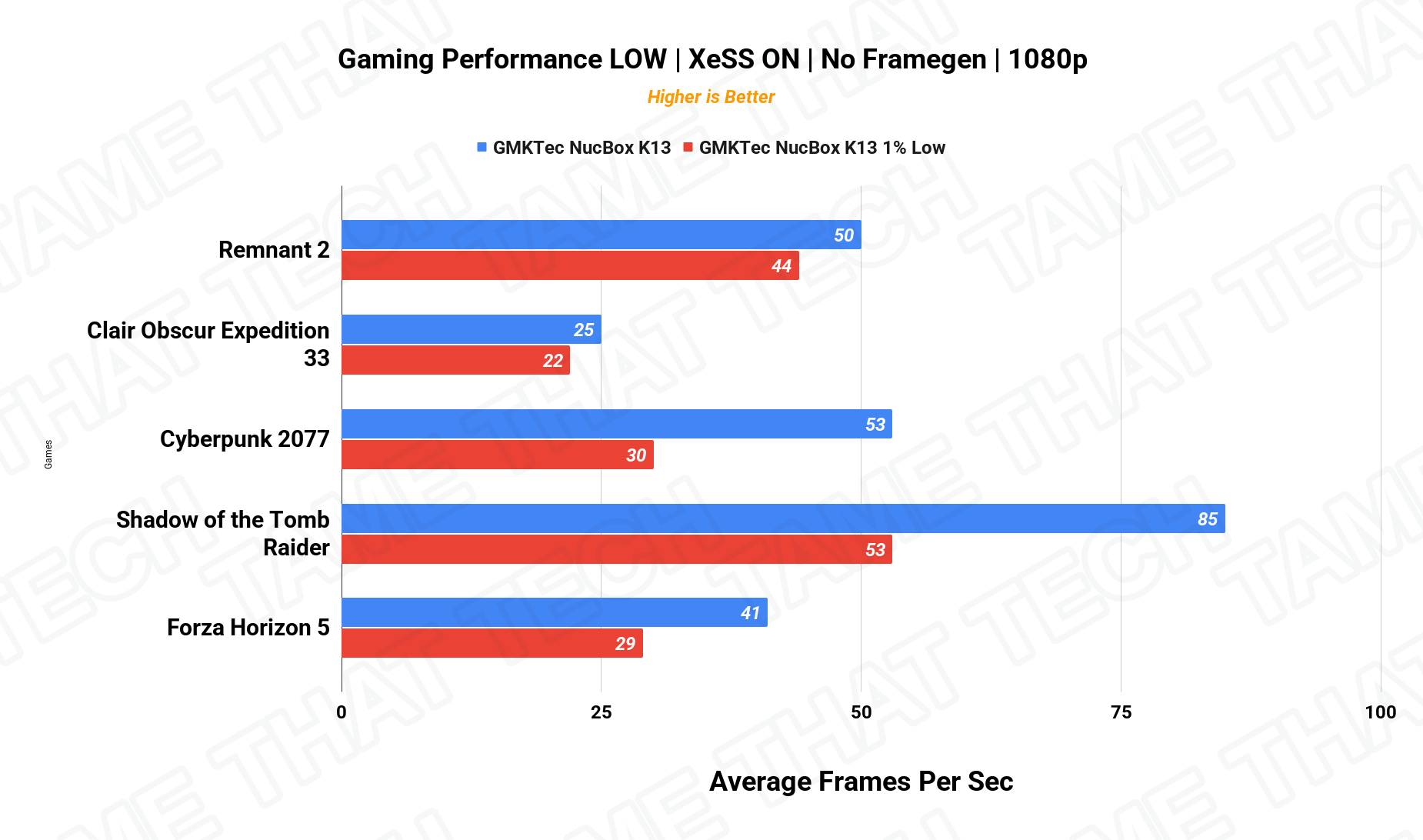
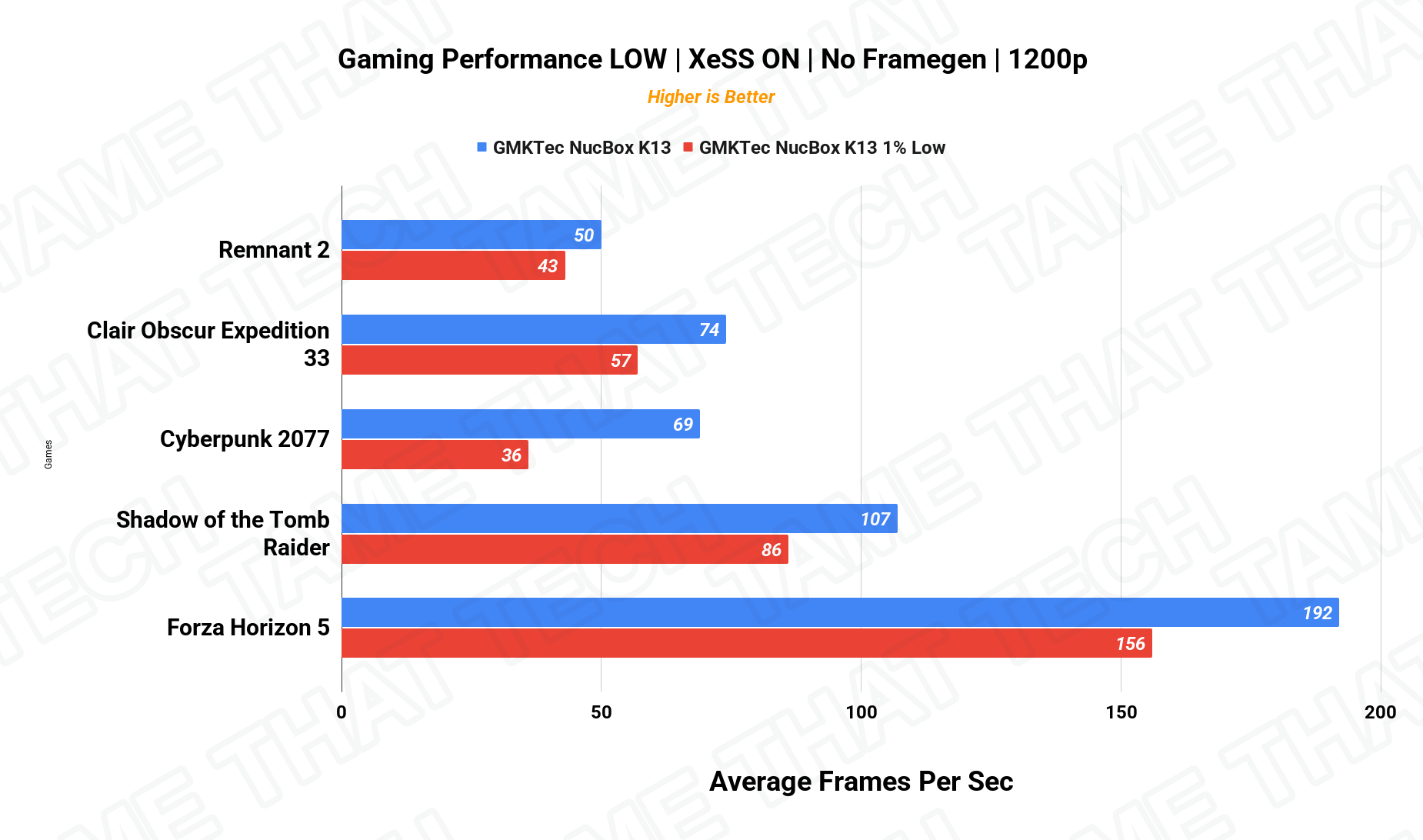
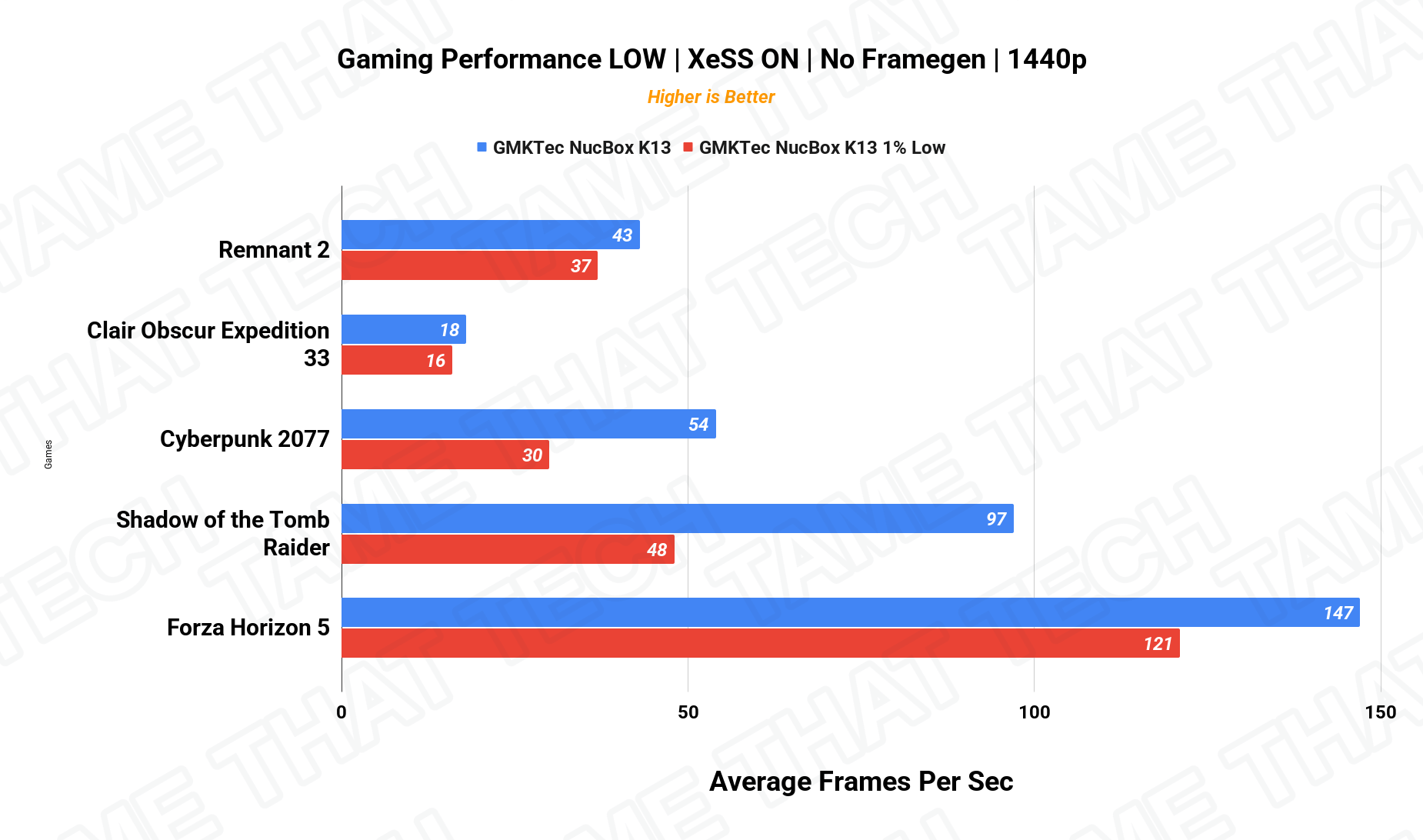
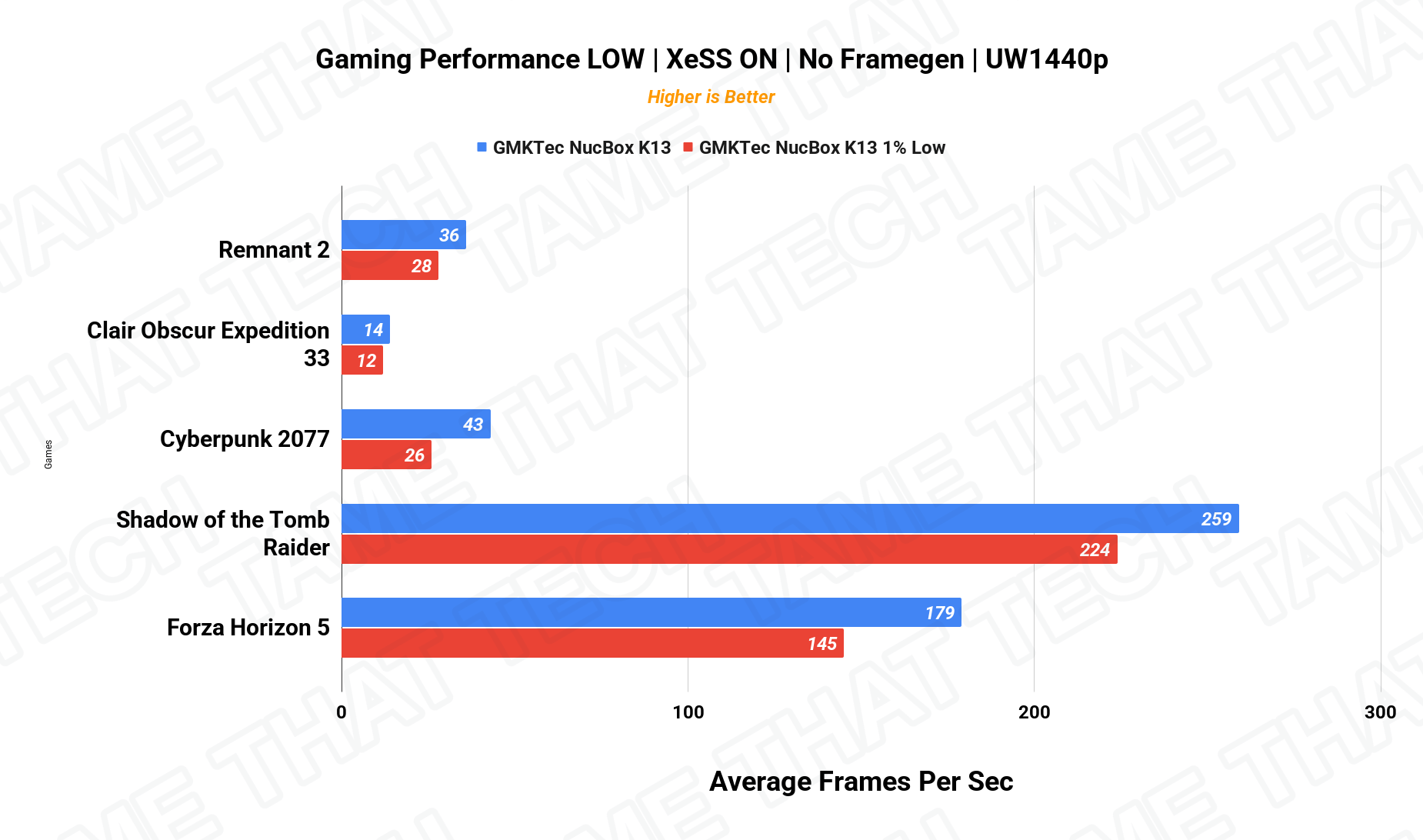
| Game (avg fps) | 1080p |
|---|---|
| Cyberpunk 2077 | 53 |
| Shadow of the Tomb Raider | 85 |
In Cyberpunk 2077 at 1080p on low settings, we averaged a very playable 53 fps. Shadow of the Tomb Raider performed even better, pulling in 85 fps at 1080p. For integrated graphics, that’s seriously impressive — a huge jump over previous-generation Intel iGPUs.
One thing to keep in mind: the K13 lacks the dedicated OCuLink port found on the GMKtec K16, so if you want to use an external GPU, you’ll have to route it through the USB4 ports instead.
Creator Workloads — Cinebench & DaVinci Resolve
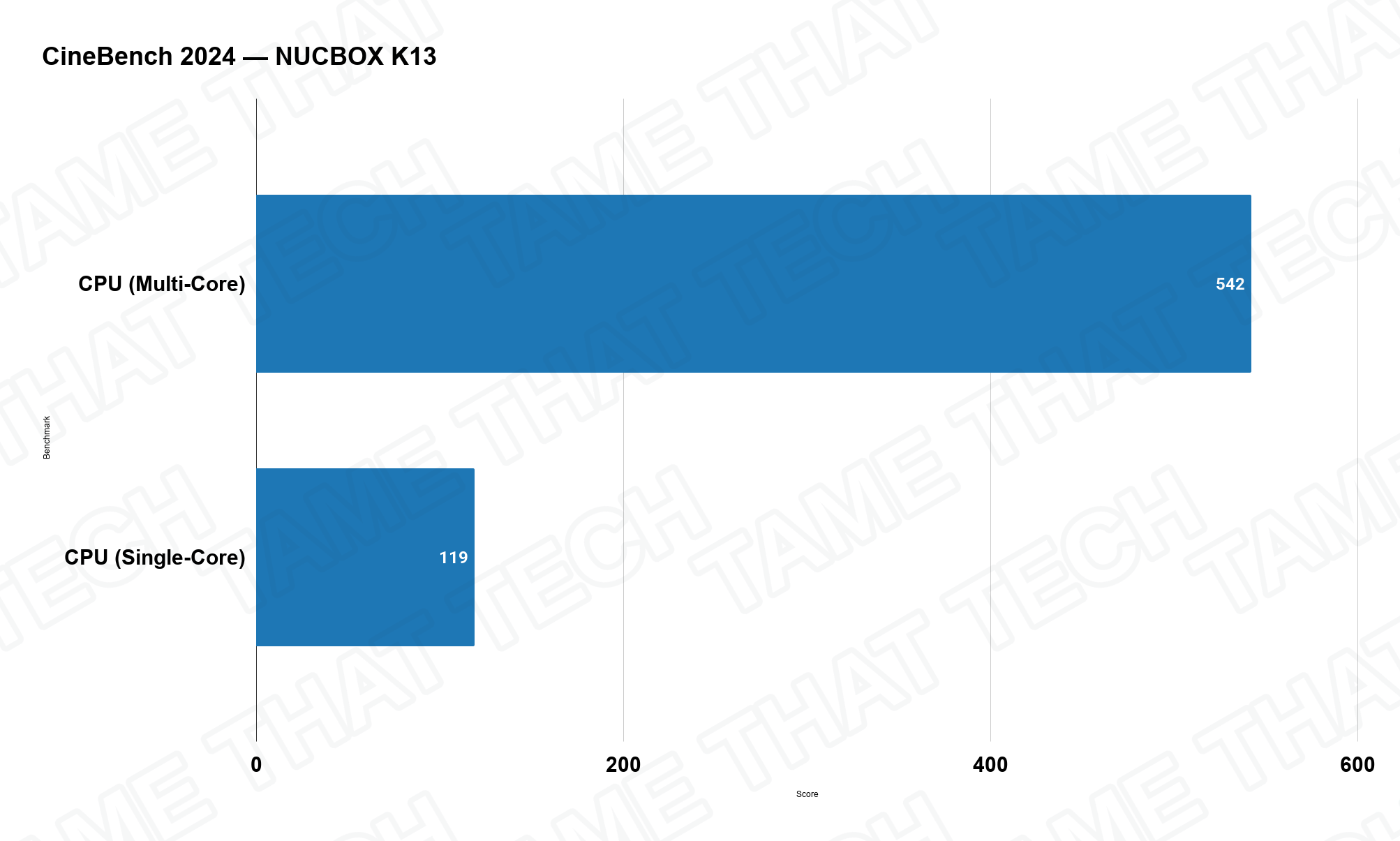
In Cinebench 2024, the K13 scored 542 multi-core — respectable for an 8-core/8-thread chip running at just 37 W, and a clear demonstration of Lunar Lake’s efficiency advantage. Just don’t expect it to match higher-wattage AMD chips in sustained multi-core rendering workloads.
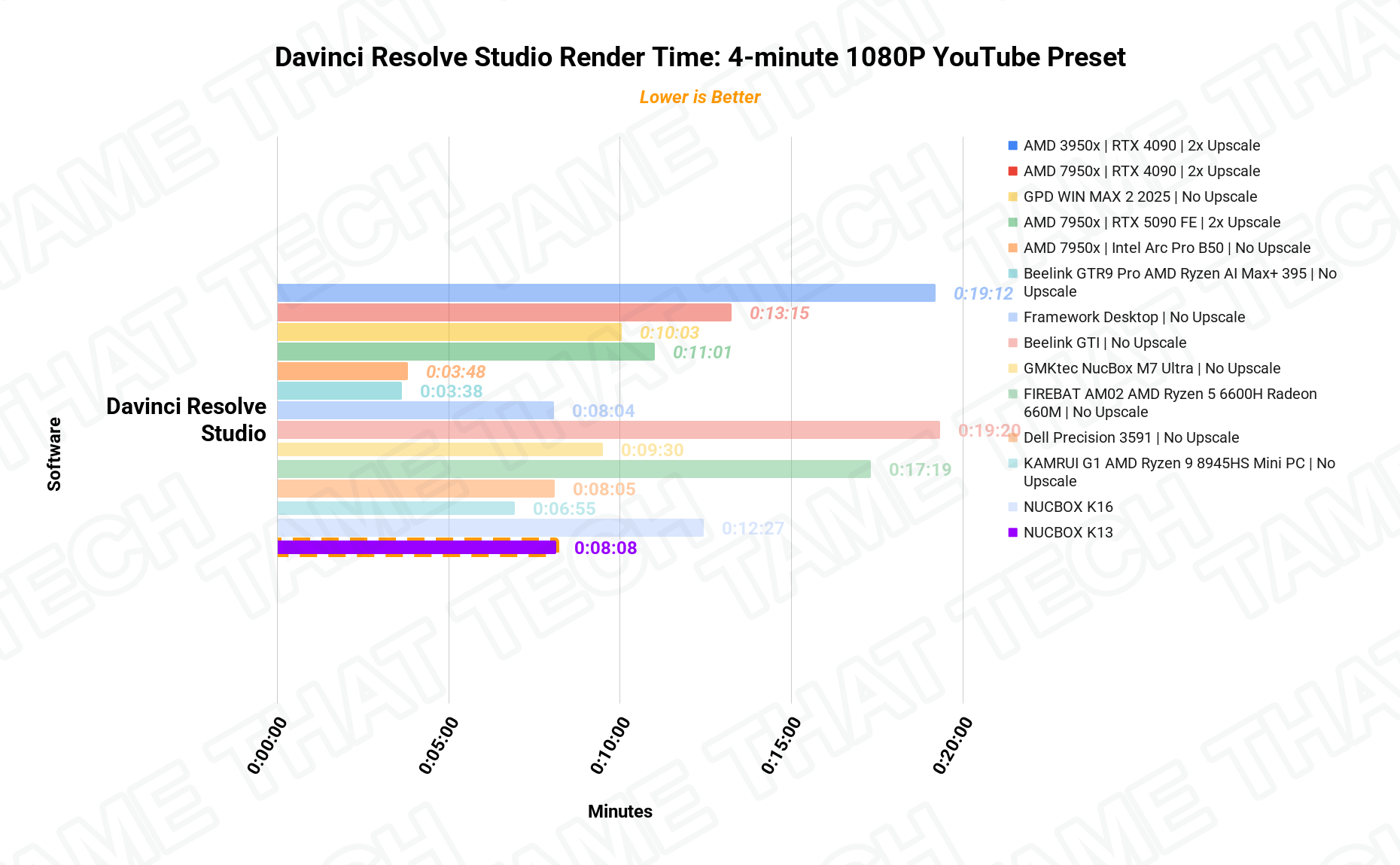
DaVinci Resolve rendering is workable for short clips, but multi-core-heavy rendering tasks will trail behind higher-wattage AMD chips — it’s an efficiency machine, not a render farm.
Local AI — NPU & LLM Inference
This chip packs a dedicated Neural Processing Unit capable of 47 TOPS; combine CPU, GPU, and NPU and the total system pushes 115 TOPS — one of the highest figures in this class.
For local LLM inferencing, it performs exceptionally well for its size thanks to the fast integrated memory. Just remember: that soldered 16 GB of RAM means you’ll be limited to smaller parameter models, so don’t expect to run massive open-source models locally.
Price & Availability
The NucBox K13 sits in the premium-ultraportable tier of mini PCs — you’re paying for the newest Intel architecture, the Arc 140V graphics, dual USB4, and the 5 GbE port. Check current listings for configs and coupons, and weigh the soldered-RAM trade-off against your actual needs before you buy.
Pros
- Lunar Lake chip is incredibly power-efficient (37 W max)
- Arc 140V integrated graphics are fantastic — 53 fps Cyberpunk at 1080p
- Dual USB4 ports with single-cable 100 W power delivery potential
- 5 GbE LAN — a huge plus for power users and homelabs
- Up to 16 TB of dual M.2 storage
- 115 TOPS total AI performance
Cons
- 16 GB of soldered RAM cannot be upgraded — ever
- HDMI port doesn’t support true 4K at 120 Hz (TMDS)
- Multi-core-heavy rendering trails higher-wattage AMD chips
- No OCuLink port (eGPU via USB4 only)
The bottom line
The GMKtec NucBox K13 is a uniquely engineered machine. It’s perfect for the professional who wants an ultra-clean, one-cable desk setup, or the homelab user craving that 5 GbE networking speed. If you don’t mind the memory limit, it brings next-generation Intel efficiency to your desktop — in all its glory.
— Tame That Tech Minion
Discussion