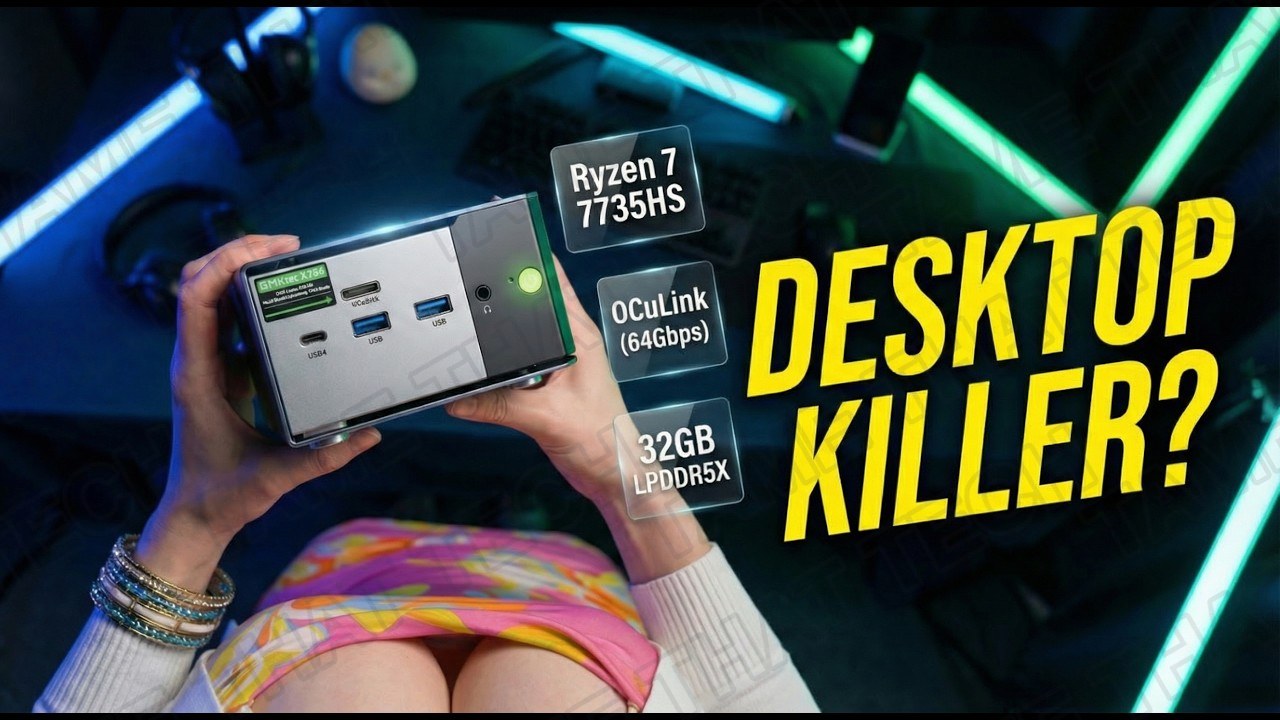
GMKtec NucBox K16 Review: An Affordable Beast Mini PC with Ryzen 7 7735HS + OCuLink
Tiny PCs are getting faster, but the GMKtec NucBox K16 might just be the ultimate “do-it-all” compact workstation. It brings the AMD Ryzen 7 7735HS to the table — and what makes it special isn’t just the CPU. It packs both USB4 and a dedicated OCuLink port for massive external GPU performance, wrapped in a premium CNC-machined aluminum chassis. Is this the perfect balance of price, power, and portability? Let’s find out.
Short version: this is one of the most complete compact machines we’ve tested — workstation-class performance during the day, a serious gaming machine at night when you plug an eGPU in. The trade-offs are soldered RAM and the OCuLink “no hot-plug” quirk.
TL;DR — The 10-second verdict
| What it is | A premium aluminum mini PC with an AMD Ryzen 7 7735HS, Radeon 680M graphics, 32 GB LPDDR5X, and OCuLink + USB4 external GPU support |
| Who it’s for | Users who want a clean desk setup by day and a gaming machine by night — homelab fans get dual 2.5 GbE on top |
| The headline | OCuLink (PCIe 4.0 x4) + USB4 give this tiny box real external-GPU potential, with a great CPU inside |
| The catch | RAM is soldered (no upgrades) and OCuLink is not hot-pluggable — you must power off to connect an eGPU |
| Our take | A niche but powerful tool — one of the best values for eGPU-ready compact machines right now |
| Where To Buy (Affiliate Links) | Amazon · Mavely · JoyLink |
| Video Review | YouTube |
Hardware & Specs
| Component | Specification |
|---|---|
| CPU | AMD Ryzen 7 7735HS — 8 cores, 16 threads, up to 4.75 GHz, Zen 3+ |
| GPU | AMD Radeon 680M (RDNA2) — integrated |
| Memory | 32 GB LPDDR5X-6400, soldered (not upgradable) |
| Storage | 1 TB PCIe 4.0 NVMe SSD |
| Networking | Dual 2.5 GbE LAN · MediaTek Wi-Fi 6E |
| Front I/O | Neon-green power button · 3.5 mm audio jack · 2× USB 3.2 Gen2 · OCuLink |
| Rear I/O | 2× USB · dual 2.5 GbE LAN · USB4 (40 Gbps, 100 W Power Delivery) |
| Display Out | Triple displays: HDMI 2.1 · DisplayPort 1.4 · USB4 |
| eGPU | OCuLink — direct PCIe 4.0 x4 connection (not hot-pluggable) |
| Chassis | CNC-machined aluminum, “sandwich” cooling design with side/top vents |
OCuLink is a game-changer for gamers. It offers a direct PCIe Gen4 ×4 connection to an external GPU, giving you far more bandwidth than Thunderbolt could ever dream of. The RAM, meanwhile, is soldered to the board to achieve those high LPDDR5X speeds — so you won’t be upgrading to 64 GB later. Thirty-two gigabytes is plenty for almost any task today, but it’s final.
Design & Build Quality
Holding the K16 for the first time, the CNC-machined aluminum chassis feels incredibly premium — dense, cold to the touch, and much sturdier than the plastic shells we usually see in this price bracket. The K16 uses a “sandwich”-style cooling design with vents on the sides and top, and up front sits that distinctive neon-green power button next to the 3.5 mm audio jack, two USB 3.2 Gen2 ports, and the star of the show: the OCuLink port.
Connectivity & I/O
The rear I/O is just as impressive: two more USB ports, the dual 2.5 GbE LAN — which is amazing for home labs or firewalls — and a full-featured USB4 port with 100 W Power Delivery. That means you can actually power the whole PC with a single cable from a compatible monitor, and drive three displays simultaneously via HDMI 2.1, DisplayPort 1.4, and USB4.
One thing to remember: OCuLink is not hot-pluggable — you must turn the PC off to connect or disconnect your eGPU.
Thermals & Noise
GMKtec addressed the “hot chip in a small box” problem with a dual-fan cooling system: a dedicated turbine fan for the CPU and a secondary system fan to keep the SSD and RAM cool.
In our testing, fan noise stayed around 35 dB in Balanced mode — audible under heavy load, but a low, consistent pitch that’s easy to ignore.
Gaming Performance
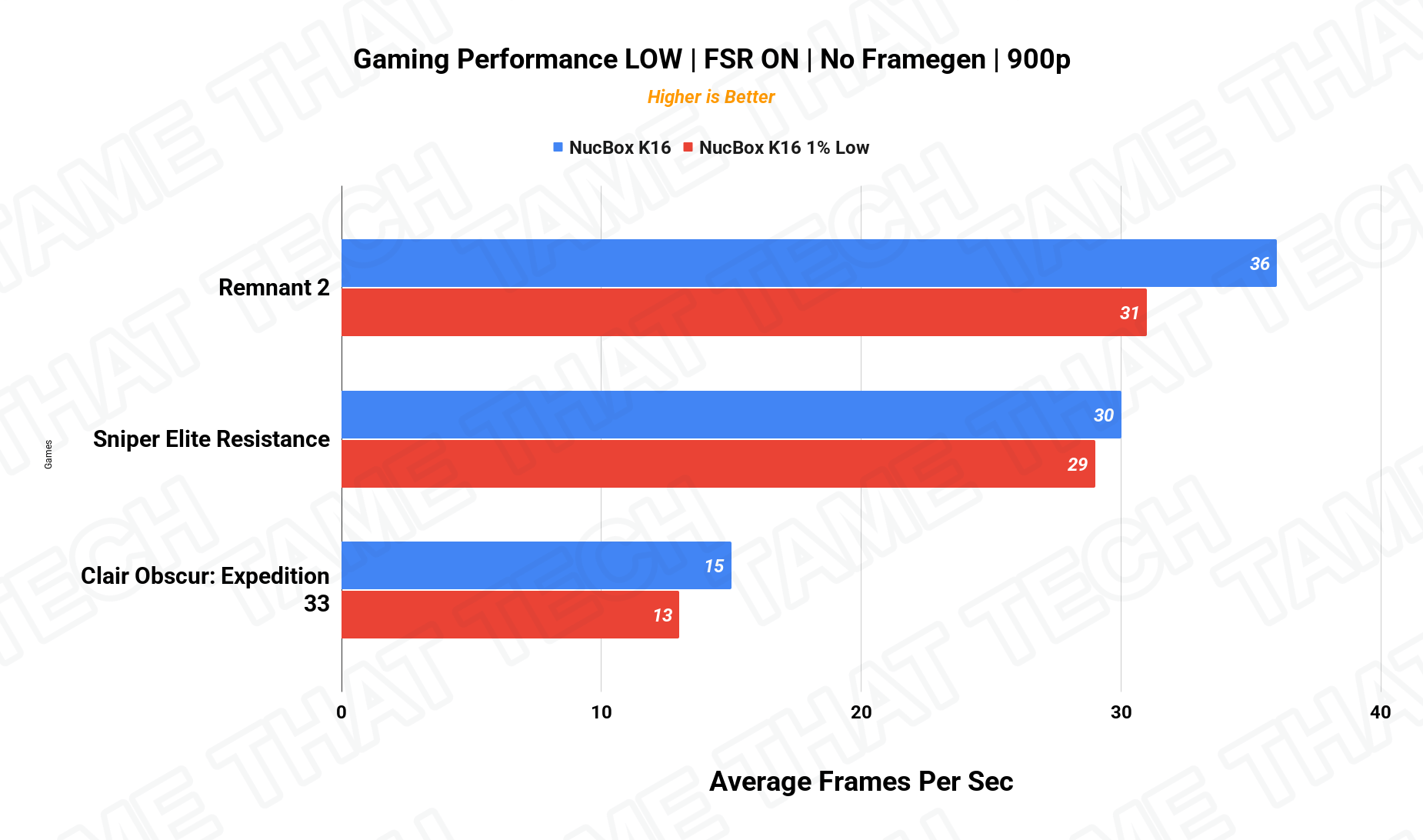
Settings: LOW quality, FSR ON, no frame generation — the Radeon 680M is still a beast for integrated graphics.
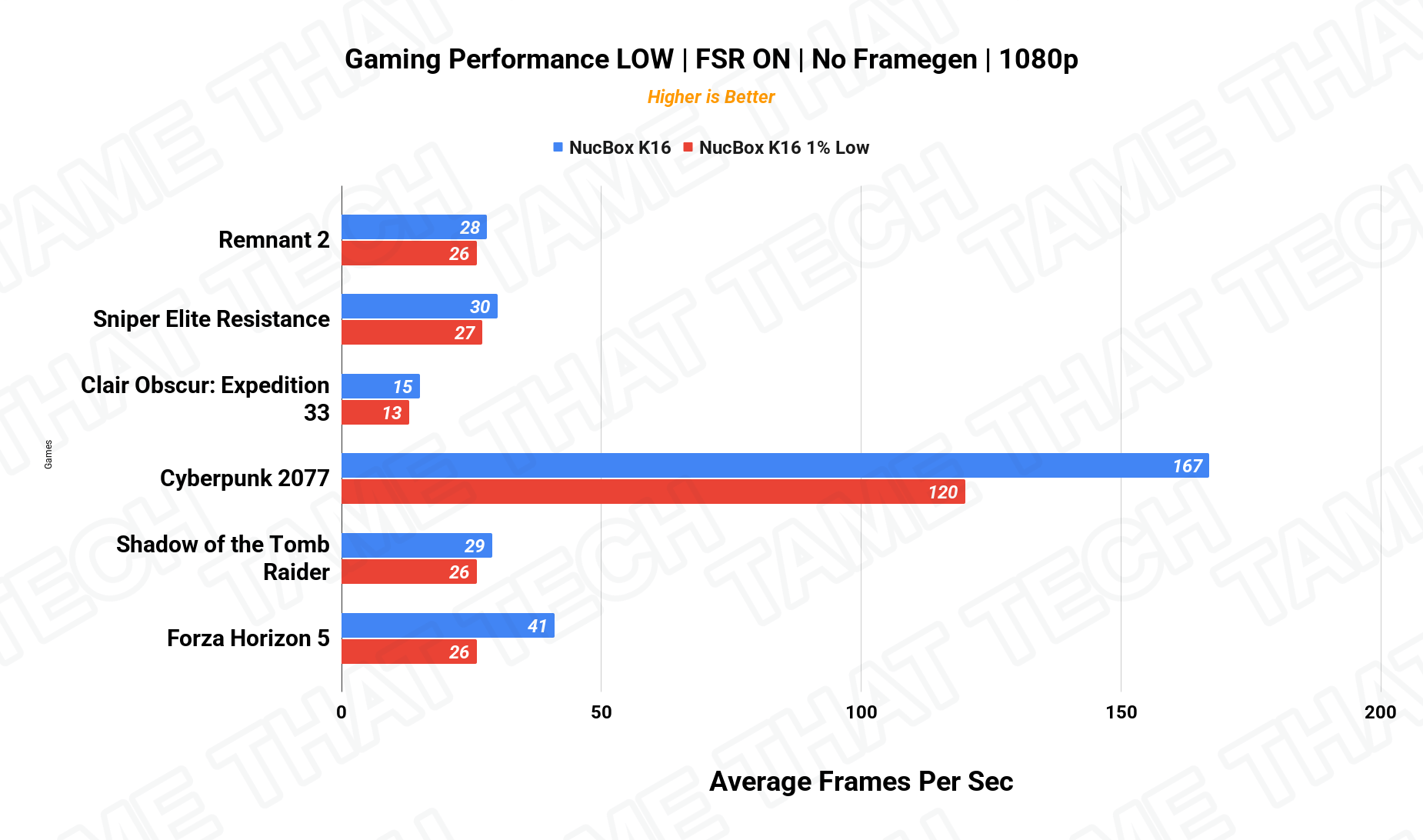
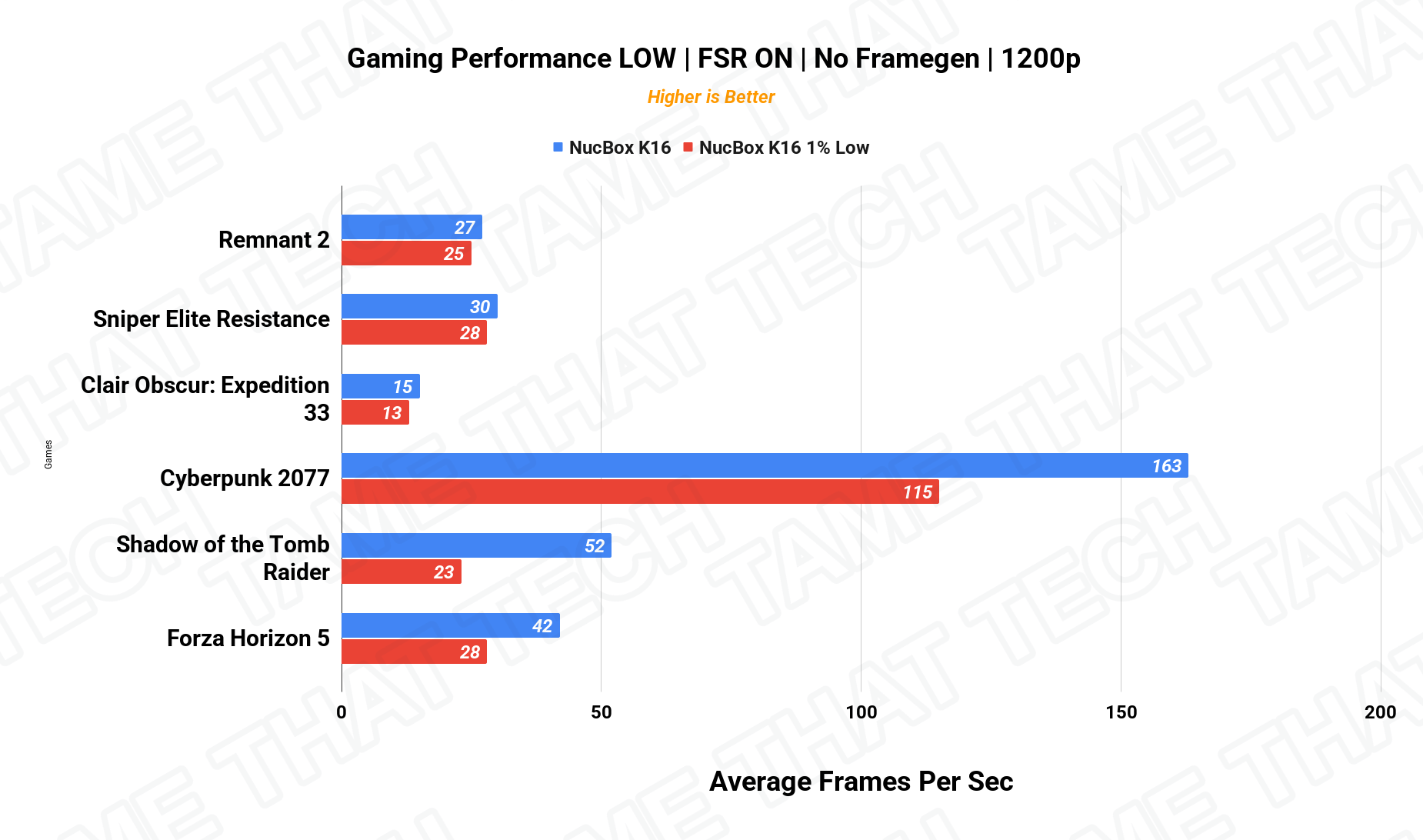
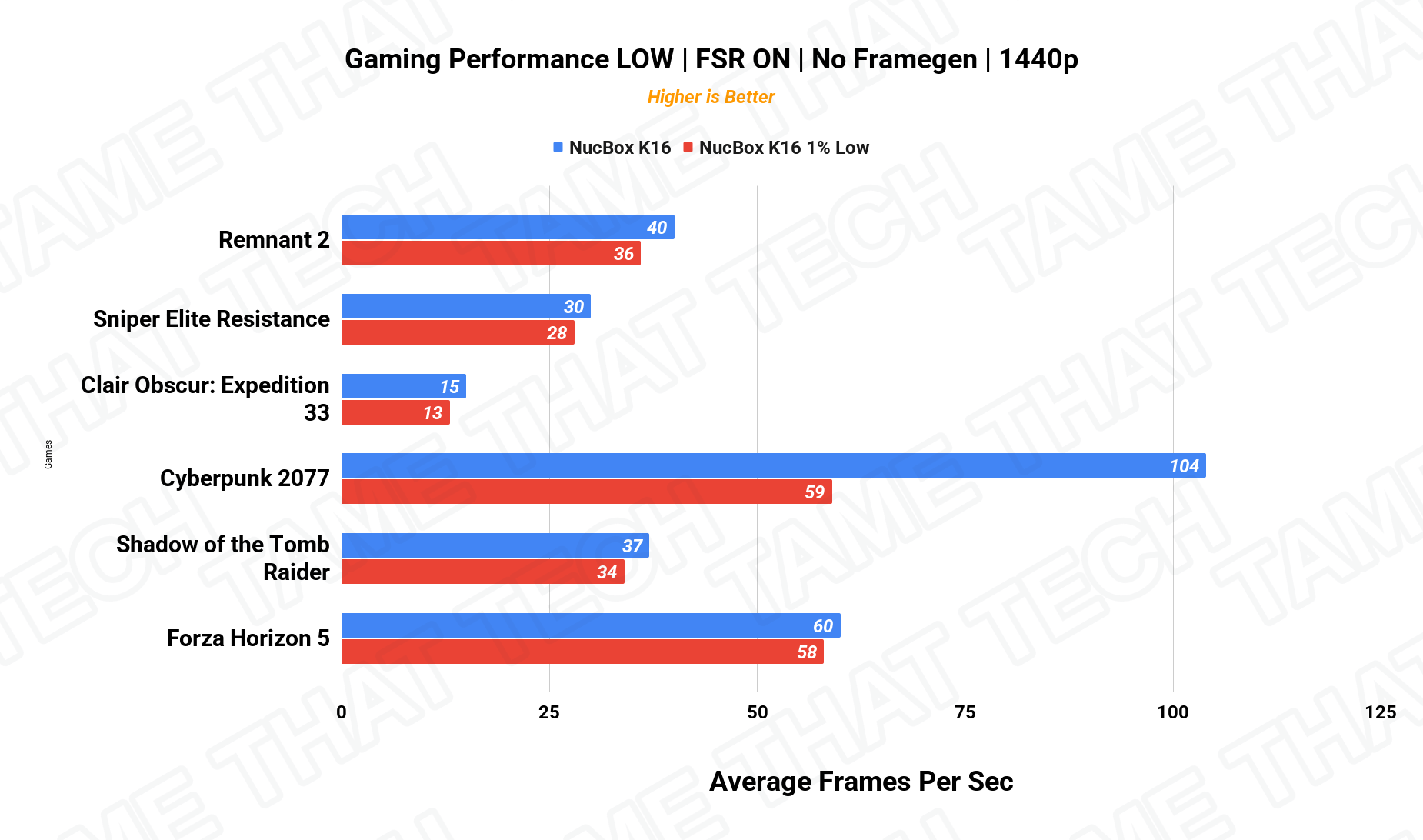
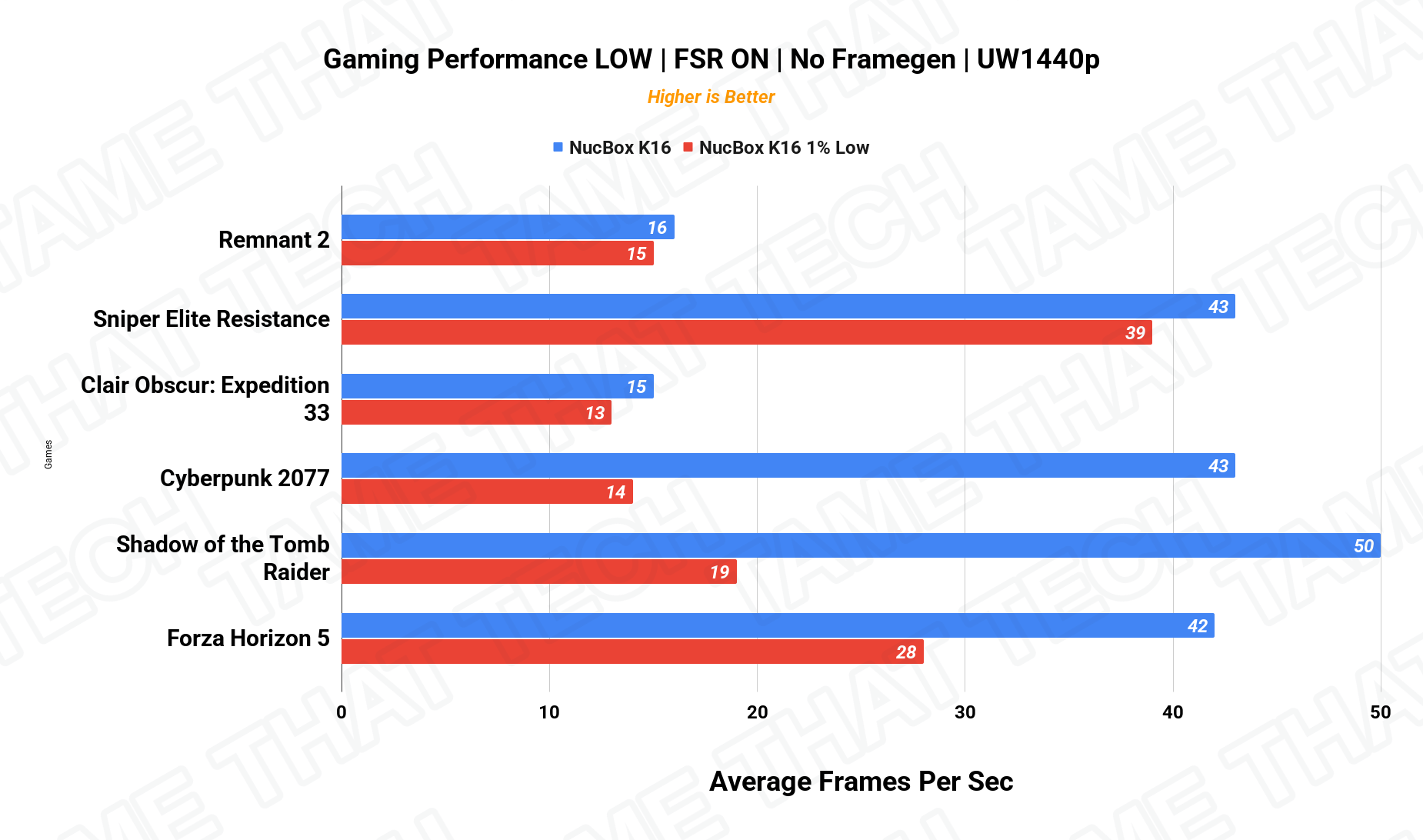
| Game (avg fps, 1080p) | FPS |
|---|---|
| Counter-Strike 2 | 95 |
| Forza Horizon 5 | 65 |
| Shadow of the Tomb Raider | 48 |
| Cyberpunk 2077 | 42 |
For a box this small, that’s incredible performance — CS2 at 95 fps is comfortably in eSports territory, and Forza Horizon 5 at 65 fps is very playable. And remember: if you plug an RTX 4070-class card into that OCuLink port, this basically becomes a high-end desktop gaming rig.
Creator Workloads — DaVinci Resolve
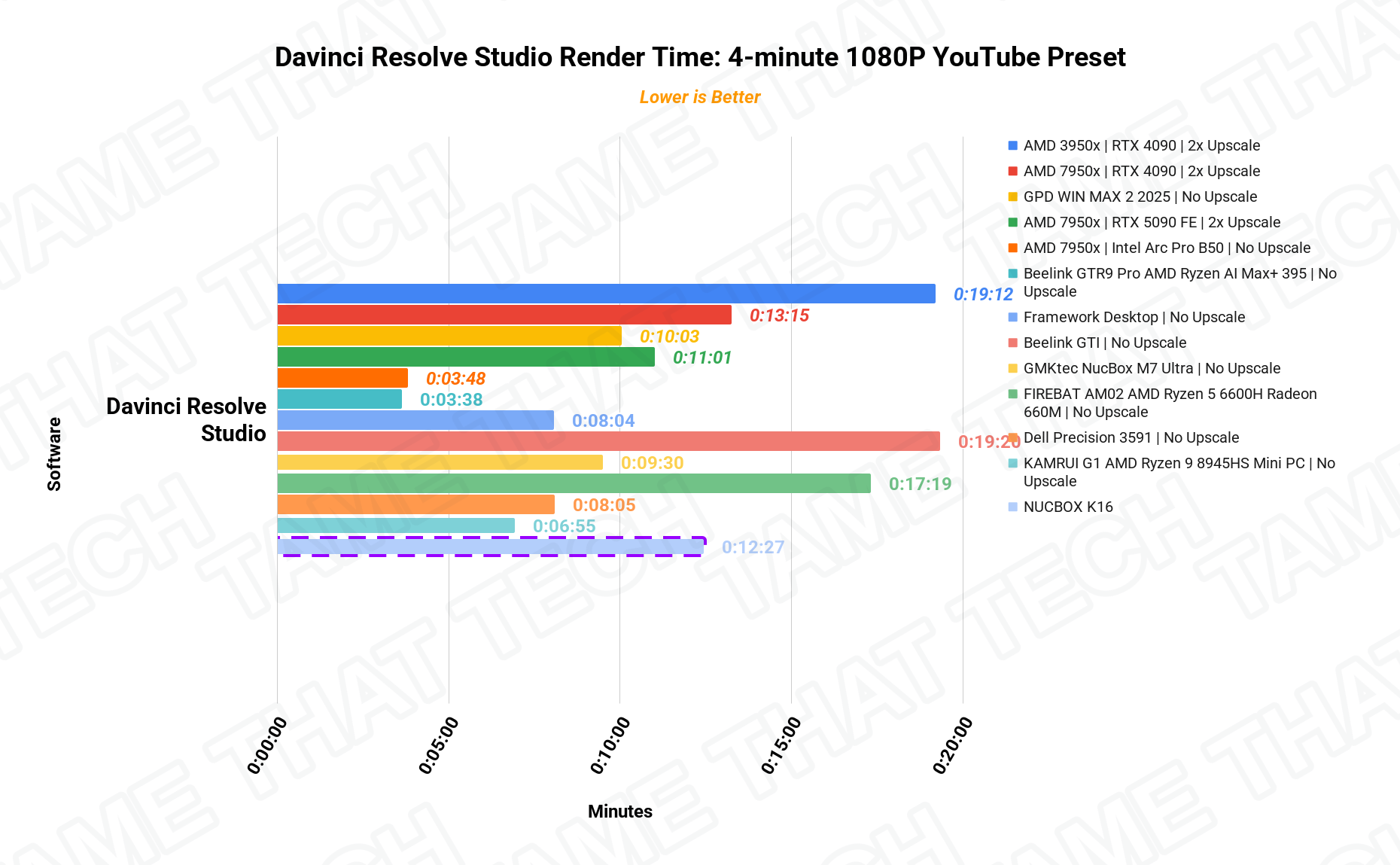
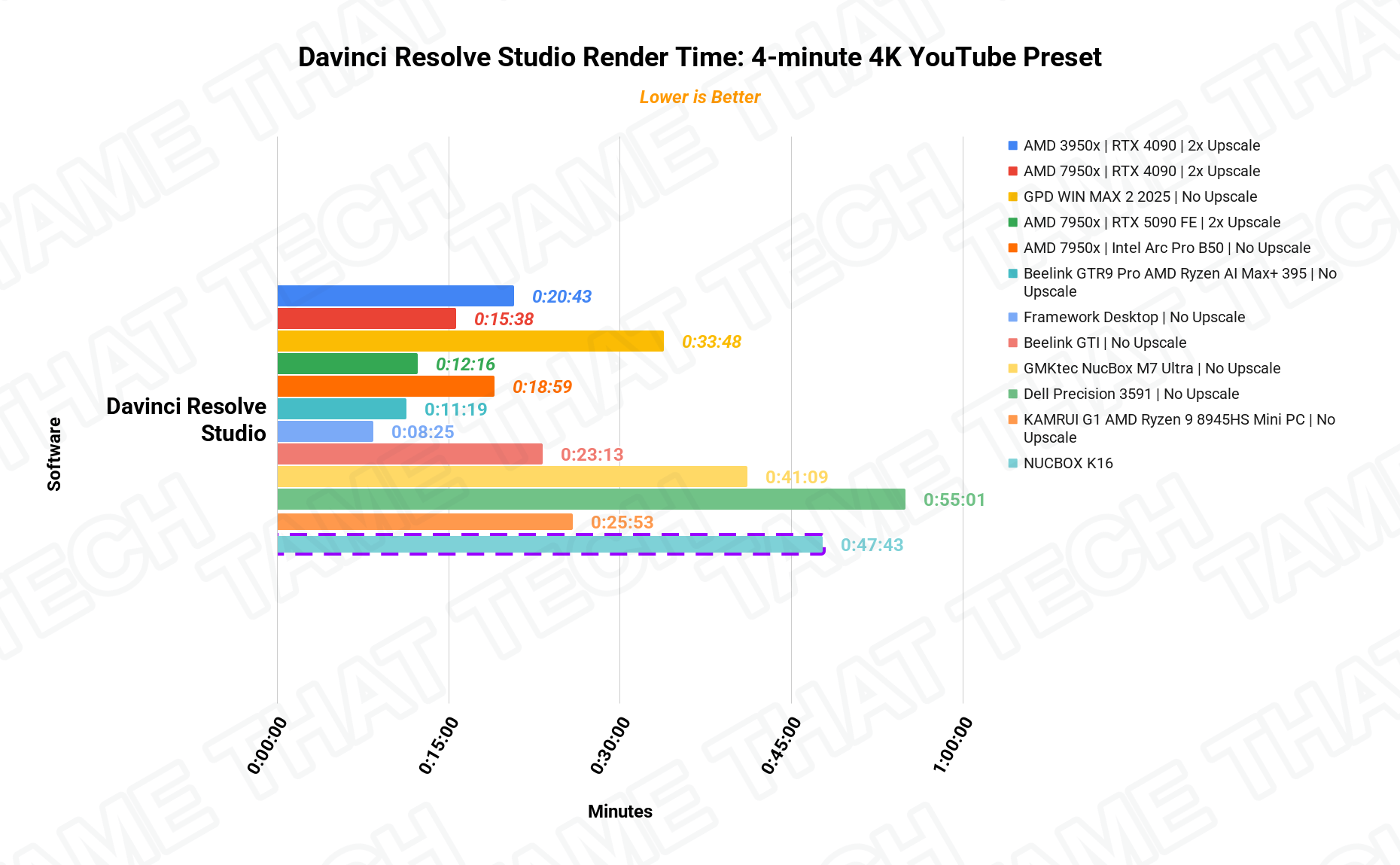
The Ryzen 7 7735HS handles DaVinci Resolve editing comfortably for a machine without a discrete GPU — 1080p timelines scrub with ease, and the included charts show exactly how it lands against other systems we’ve tested. It’s a “set it and forget it” machine for export work: fine for short clips and occasional renders, not a real-time 4K editing workstation.
Price & Availability
The NucBox K16 targets the sweet spot of the mini PC market: a premium aluminum build, 32 GB of fast memory, dual LAN, USB4, and OCuLink at a very competitive price. Check current listings for configs and coupons — and if you’re shopping for an eGPU-ready compact machine, this is one of the best values you can find right now.
Pros
- Massive performance from the Ryzen 7 7735HS (8C/16T)
- OCuLink + USB4 — the best external expansion options in the market
- Dual 2.5 GbE LAN is a huge plus for power users and homelabs
- Premium CNC-machined aluminum build quality
- 32 GB LPDDR5X and 1 TB NVMe out of the box
Cons
- Soldered RAM — no future memory upgrades
- OCuLink is not hot-pluggable — power off to connect your eGPU
- Integrated graphics still hit a wall on the heaviest next-gen titles (until you add an eGPU)
The bottom line
The GMKtec NucBox K16 is a niche but powerful tool. It’s for the user who wants a clean desk setup during the day and a powerful gaming machine at night — it brings workstation-class features to the mini PC space, in all its glory. If you need the dual LAN for networking or the OCuLink for gaming, this is one of the best values you can find right now.
— Tame That Tech Minion
Discussion